First post in a two-part series on Platform Engineering on Azure. If your developers still need tickets, handoffs, or tribal knowledge to get a usable environment, your delivery system is slower than your codebase.
Platform Engineering is how you fix that. The goal is not to hide infrastructure from developers. The goal is to package infrastructure, security, and observability into a self-service product developers can trust. On Azure, that means combining Microsoft Dev Center, Azure Deployment Environments, Bicep, and a shared runtime such as AKS.
This post covers the foundation of an Internal Developer Platform (IDP): self-service environment provisioning, reusable Bicep templates, a reference architecture, and a multi-tenant AKS runtime. In Part 2, the focus shifts to governance, observability, and zero-secret security patterns.
tl;dr
- Build the IDP around Dev Center, Azure Deployment Environments, Bicep, and a shared AKS runtime.
- Give teams self-service environments with guardrails instead of tickets.
- Keep the platform opinionated enough to be useful, but not so rigid that teams work around it.
What Platform Engineering is, and why it matters now
Platform Engineering is the discipline of building internal platforms that reduce developer cognitive load without reducing engineering standards. It emerged because “you build it, you run it” was directionally right, but in many companies it drifted into “you build it, and you must also become a networking, IAM, CI/CD, and Kubernetes expert.”
That trade-off does not scale.
| Operating model | Who provisions infrastructure? | Who operates it? | Typical problem |
|---|---|---|---|
| Traditional Ops | Central infrastructure team via tickets | Central infrastructure team | Slow delivery, bottlenecks, shadow IT |
| Pure DevOps | Each product team | Each product team | High cognitive load, duplicated patterns, inconsistent quality |
| Platform Engineering | Self-service platform | Product teams plus platform automation | Developer autonomy with guardrails |
The pattern is easy to see: teams with a real internal platform onboard faster, deploy more often, and rely less on whoever happens to be the local expert that week.
The four pillars of a practical IDP
Self-service with guardrails
Developers provision what they need without opening tickets, but inside approved limits for cost, security, and architecture.Golden paths
The platform offers an opinionated default for common workloads. Not the only path, but the fastest safe path.Useful abstractions
Developers should ask for “a production-ready PostgreSQL-backed service” rather than manually composing every Azure resource.Built-in observability
Every environment starts with logs, metrics, tracing, and basic alerts already wired in.
Azure building blocks for Platform Engineering
The Azure ecosystem already contains most of what you need for a serious IDP.
| Component | Role in the platform | Azure service |
|---|---|---|
| Environment catalog | Versioned infrastructure templates | Azure Deployment Environments |
| Developer portal / control plane | Self-service entry point | Microsoft Dev Center |
| Infrastructure orchestration | Declarative provisioning | Bicep / ARM |
| Application runtime | Shared workload execution | AKS / Azure Container Apps |
| Governance | Policy and compliance guardrails | Azure Policy + RBAC |
| Observability | Metrics, logs, traces | Azure Monitor + Managed Grafana |
| Identity | Authentication and authorization | Microsoft Entra ID |
| Secrets | Credentials and secret storage | Azure Key Vault |
Azure Deployment Environments and Dev Center
Azure Deployment Environments (ADE) is the engine that turns infrastructure templates into self-service products. The platform team publishes curated templates. Developers consume them on demand. Dev Center provides the control plane: projects, catalogs, environment types, and the operating surface for teams.
The flow is straightforward:
- The platform team stores Bicep templates in Git.
- Dev Center registers that repository as a catalog.
- ADE exposes the templates as environment definitions.
- Developers create environments through the portal or CLI.
- Policies, quotas, and identity controls are applied automatically.
That is the shift from “please provision this for me” to “here is the approved platform product.”
Reference architecture
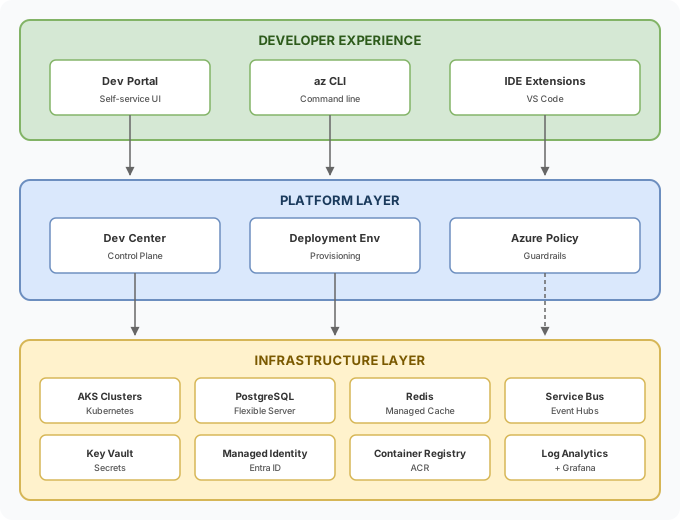
The important design idea is that the developer interacts with a small number of platform concepts, while the platform owns the messy details underneath.
Step-by-step implementation
The fastest way to get this running is to set up Dev Center first, then layer catalogs, templates, and the shared AKS runtime.
Step 1: Configure Dev Center
Start by creating the platform resource group and Dev Center instance.
# Variables
RESOURCE_GROUP="rg-platform-engineering"
LOCATION="eastus"
DEVCENTER_NAME="dc-platform"

# Create resource group
az group create \
  --name $RESOURCE_GROUP \
  --location $LOCATION

# Create Dev Center
az devcenter admin devcenter create \
  --name $DEVCENTER_NAME \
  --resource-group $RESOURCE_GROUP \
  --location $LOCATION \
  --identity-type SystemAssigned
Dev Center gets a managed identity that the platform can later use to deploy approved resources into target subscriptions.
Step 2: Create a project
Projects are how you represent teams or products. Each project gets its own environments, permissions, and limits.
PROJECT_NAME="proj-payments-team"

az devcenter admin project create \
  --name $PROJECT_NAME \
  --resource-group $RESOURCE_GROUP \
  --location $LOCATION \
  --dev-center-id "/subscriptions/<sub-id>/resourceGroups/$RESOURCE_GROUP/providers/Microsoft.DevCenter/devcenters/$DEVCENTER_NAME" \
  --max-dev-boxes-per-user 2
Step 3: Connect a Git-based catalog
The catalog is where your golden paths live.
az devcenter admin catalog create \
  --name "infra-templates" \
  --resource-group $RESOURCE_GROUP \
  --dev-center-name $DEVCENTER_NAME \
  --git-hub \
    uri="https://github.com/your-org/platform-catalog.git" \
    branch="main" \
    path="/environments"
Treat this repository like a real product surface: version it, review it, test it, and document breaking changes.
Step 4: Build the Bicep templates
The heart of the IDP is the catalog itself. A good starting point is a reusable microservice environment template that provisions shared AKS integration, a database, cache, and observability defaults.
Catalog structure
/environments
  /microservice-standard
    environment.yaml
    main.bicep
    modules/
      aks-namespace.bicep
      database.bicep
      cache.bicep
      observability.bicep
environment.yaml
name: microservice-standard
version: 1.0.0
summary: "Standard microservice environment with database, cache, and observability"
description: "Provisions a namespace in shared AKS, PostgreSQL Flexible Server, a Redis integration point, and Grafana-ready outputs"
runner: Bicep
templatePath: main.bicep
parameters:
  - id: serviceName
    name: "Service name"
    description: "Microservice name (kebab-case, max 20 chars)"
    type: string
    required: true
  - id: tier
    name: "Tier"
    description: "Resource tier (dev = basic, prod = highly available)"
    type: string
    required: true
    allowedValues:
      - dev
      - staging
      - prod
  - id: enableRedis
    name: "Enable Redis"
    description: "Provision the Redis layer (prefer Azure Managed Redis for new deployments)"
    type: boolean
    default: true
main.bicep
@description('Microservice name')
@minLength(3)
@maxLength(20)
param serviceName string

@description('Environment tier')
@allowed(['dev', 'staging', 'prod'])
param tier string

@description('Enable Redis Cache')
param enableRedis bool = true

@secure()
param administratorPassword string

param dateTag string = utcNow('yyyy-MM-dd')

param location string = resourceGroup().location

// Standard platform tags
var commonTags = {
  platform: 'idp-platform'
  service: serviceName
  tier: tier
  managedBy: 'deployment-environments'
  createdAt: dateTag
}

// Configuration by tier
var tierConfig = {
  dev: {
    dbSkuName: 'Standard_B1ms'
    dbStorageGb: 32
    dbHaMode: 'Disabled'
    redisSkuName: 'Basic'
    redisFamily: 'C'
    redisCapacity: 0
  }
  staging: {
    dbSkuName: 'Standard_B2ms'
    dbStorageGb: 64
    dbHaMode: 'Disabled'
    redisSkuName: 'Standard'
    redisFamily: 'C'
    redisCapacity: 1
  }
  prod: {
    dbSkuName: 'Standard_D2ds_v4'
    dbStorageGb: 128
    dbHaMode: 'ZoneRedundant'
    redisSkuName: 'Premium'
    redisFamily: 'P'
    redisCapacity: 1
  }
}

var config = tierConfig[tier]

// For net-new 2026 deployments, implement the cache module with Azure Managed Redis rather than legacy Azure Cache for Redis SKUs.

// PostgreSQL Flexible Server
module database 'modules/database.bicep' = {
  name: 'deploy-db-${serviceName}'
  params: {
    serverName: 'psql-${serviceName}-${tier}'
    location: location
    skuName: config.dbSkuName
    storageSizeGB: config.dbStorageGb
    haMode: config.dbHaMode
    administratorPassword: administratorPassword
    tags: commonTags
  }
}

// Redis layer (conditional) - prefer Azure Managed Redis for new deployments
module cache 'modules/cache.bicep' = if (enableRedis) {
  name: 'deploy-cache-${serviceName}'
  params: {
    cacheName: 'redis-${serviceName}-${tier}'
    location: location
    skuName: config.redisSkuName
    family: config.redisFamily
    capacity: config.redisCapacity
    tags: commonTags
  }
}

// Observability
module observability 'modules/observability.bicep' = {
  name: 'deploy-obs-${serviceName}'
  params: {
    serviceName: serviceName
    tier: tier
    location: location
    tags: commonTags
  }
}

// Outputs for the developer
output databaseHost string = database.outputs.fqdn
output databaseName string = database.outputs.databaseName
output redisHost string = enableRedis ? cache.outputs.hostname : 'N/A'
output grafanaDashboardUrl string = observability.outputs.dashboardUrl
output keyVaultName string = 'kv-${serviceName}-${tier}'
modules/database.bicep
param serverName string
param location string
param skuName string
param storageSizeGB int
param haMode string
param tags object

param administratorLogin string = 'platformadmin'

@secure()
param administratorPassword string

resource postgresServer 'Microsoft.DBforPostgreSQL/flexibleServers@2023-12-01-preview' = {
  name: serverName
  location: location
  tags: tags
  sku: {
    name: skuName
    tier: contains(skuName, 'B') ? 'Burstable' : 'GeneralPurpose'
  }
  properties: {
    version: '16'
    administratorLogin: administratorLogin
    administratorLoginPassword: administratorPassword
    storage: {
      storageSizeGB: storageSizeGB
      autoGrow: 'Enabled'
    }
    backup: {
      backupRetentionDays: haMode == 'ZoneRedundant' ? 35 : 7
      geoRedundantBackup: haMode == 'ZoneRedundant' ? 'Enabled' : 'Disabled'
    }
    highAvailability: {
      mode: haMode
    }
  }
}

resource defaultDatabase 'Microsoft.DBforPostgreSQL/flexibleServers/databases@2023-12-01-preview' = {
  parent: postgresServer
  name: 'app'
  properties: {
    charset: 'UTF8'
    collation: 'en_US.utf8'
  }
}

output fqdn string = postgresServer.properties.fullyQualifiedDomainName
output databaseName string = defaultDatabase.name
Step 5: Define environment types
Environment types are where the platform decides what dev, staging, and prod actually mean.
# Create environment types in Dev Center
az devcenter admin environment-type create \
  --name "dev" \
  --resource-group $RESOURCE_GROUP \
  --dev-center-name $DEVCENTER_NAME

az devcenter admin environment-type create \
  --name "staging" \
  --resource-group $RESOURCE_GROUP \
  --dev-center-name $DEVCENTER_NAME

az devcenter admin environment-type create \
  --name "prod" \
  --resource-group $RESOURCE_GROUP \
  --dev-center-name $DEVCENTER_NAME

# Attach one to the project with target subscription and identity
az devcenter admin project-environment-type create \
  --name "dev" \
  --resource-group $RESOURCE_GROUP \
  --project-name $PROJECT_NAME \
  --deployment-target-id "/subscriptions/<dev-sub-id>" \
  --identity-type "SystemAssigned" \
  --roles "{\"b24988ac-6180-42a0-ab88-20f7382dd24c\":{}}" \
  --status "Enabled"
Step 6: Let developers create environments
Now the platform becomes real. The developer does not need to know Bicep, ARM, or the internals of PostgreSQL Flexible Server.
# Developer login
az login

# List available environment definitions
az devcenter dev environment-definition list \
  --project-name "proj-payments-team" \
  --dev-center-name $DEVCENTER_NAME

# Create an environment
az devcenter dev environment create \
  --name "my-payment-svc" \
  --project-name "proj-payments-team" \
  --dev-center-name $DEVCENTER_NAME \
  --environment-type "dev" \
  --catalog-name "infra-templates" \
  --environment-definition-name "microservice-standard" \
  --parameters '{"serviceName": "payment-svc", "tier": "dev", "enableRedis": true}'
A few minutes later, the developer has a usable environment with a database, cache, and platform-defined outputs. That is what self-service is supposed to feel like.
Integrating AKS as the shared runtime
For most enterprise IDPs, AKS is the shared application runtime. That creates the next challenge: self-service without multi-tenant chaos.
The usual pattern is:
- one or more shared AKS clusters,
- namespace isolation per team or service,
- quotas to prevent noisy neighbors,
- network policies to constrain east-west traffic,
- and platform-owned identity and observability integrations.
Create the AKS cluster
AKS_NAME="aks-platform-shared"

# Create AKS with workload identity and OIDC
az aks create \
  --name $AKS_NAME \
  --resource-group $RESOURCE_GROUP \
  --location $LOCATION \
  --node-count 3 \
  --node-vm-size Standard_D4ds_v5 \
  --enable-managed-identity \
  --enable-oidc-issuer \
  --enable-workload-identity \
  --enable-azure-monitor-metrics \
  --enable-addons monitoring \
  --network-plugin azure \
  --network-policy calico \
  --tier standard
Bicep template for an isolated namespace
Each environment template can include a namespace bootstrap step that applies resource quotas and a default network policy automatically.
param namespaceName string
param teamName string
param cpuLimit string = '4'
param memoryLimit string = '8Gi'
param maxPods int = 20
param deploymentScriptIdentityResourceId string

// This module would run through a deployment script or AKS extension
resource deploymentScript 'Microsoft.Resources/deploymentScripts@2023-08-01' = {
  name: 'configure-namespace-${namespaceName}'
  location: resourceGroup().location
  identity: {
    type: 'UserAssigned'
    userAssignedIdentities: {
      '${deploymentScriptIdentityResourceId}': {}
    }
  }
  kind: 'AzureCLI'
  properties: {
    azCliVersion: '2.60.0'
    retentionInterval: 'P1D'
    scriptContent: '''
      az aks install-cli
      az aks get-credentials --resource-group ${RG} --name ${AKS}

      # Create namespace
      kubectl create namespace ${NAMESPACE} --dry-run=client -o yaml | kubectl apply -f -

      # Resource quota
      cat <<EOF | kubectl apply -f -
      apiVersion: v1
      kind: ResourceQuota
      metadata:
        name: ${NAMESPACE}-quota
        namespace: ${NAMESPACE}
      spec:
        hard:
          requests.cpu: "${CPU_LIMIT}"
          requests.memory: "${MEM_LIMIT}"
          limits.cpu: "${CPU_LIMIT}"
          limits.memory: "${MEM_LIMIT}"
          pods: "${MAX_PODS}"
      EOF

      # Network policy: deny all ingress by default
      cat <<EOF | kubectl apply -f -
      apiVersion: networking.k8s.io/v1
      kind: NetworkPolicy
      metadata:
        name: deny-all-ingress
        namespace: ${NAMESPACE}
      spec:
        podSelector: {}
        policyTypes:
        - Ingress
      EOF

      # Labels for ownership and platform tracking
      kubectl label namespace ${NAMESPACE} team=${TEAM} platform=idp --overwrite
    '''
    environmentVariables: [
      { name: 'RG', value: resourceGroup().name }
      { name: 'AKS', value: 'aks-platform-shared' }
      { name: 'NAMESPACE', value: namespaceName }
      { name: 'CPU_LIMIT', value: cpuLimit }
      { name: 'MEM_LIMIT', value: memoryLimit }
      { name: 'MAX_PODS', value: string(maxPods) }
      { name: 'TEAM', value: teamName }
    ]
  }
}
This gives you a strong default: every new environment arrives in AKS with enforceable boundaries instead of informal conventions.
Conclusion
At this point, you have the essential mechanics of an Internal Developer Platform on Azure: Dev Center as the control plane, Azure Deployment Environments as the self-service engine, Bicep as the provisioning layer, and AKS as the shared runtime.
That is enough to get developers provisioning useful environments in minutes instead of waiting days. In Part 2, the focus shifts to the parts that make it hold up in real life: Azure Policy guardrails, built-in observability, GitHub Actions golden paths, and Workload Identity for zero secrets.
What can go wrong
- Environment sprawl — Self-service without lifecycle management means developers create environments and forget about them. Set auto-expiration policies on ADE environments (e.g., 7-day TTL for dev, 30-day for staging) and send reminders before deletion.
- Bicep template complexity creep — As teams request variations, the “one template to rule them all” grows conditional branches until nobody can maintain it. Split into composable modules (network, compute, identity) and let teams compose rather than fork.
- Dev Center permission over-provisioning — Giving every developer the
DevCenter Project Adminrole lets them modify environment types and catalog settings. UseDeployment Environments Userfor self-service and restrict admin to the platform team. - AKS namespace collisions — If the environment provisioning template does not enforce unique namespace naming, two developers requesting “my-app” get a conflict. Use a naming convention that includes the environment ID or developer alias.
- Catalog sync failures — If the GitHub catalog repo goes private, changes branch protection, or rotates the PAT, Dev Center silently stops syncing new templates. Monitor catalog sync status and alert on failures.
Estimated operational cost
Dev Center itself is free; you pay only for the environments it provisions. A typical dev AKS cluster (Standard_D4s_v5 node pool with 2-3 nodes) runs $300-500/month. Azure Deployment Environments has no per-environment charge. The dominant cost is compute: enforce auto-shutdown and auto-expiration to prevent idle environments from accumulating. Budget $50-100/developer/month for a reasonable dev environment footprint.
Series navigation
- Platform Engineering — Part 1: Internal Developer Platform on Azure ← you are here — covers the self-service side: Dev Center, ADE, environment templates
- Platform Engineering — Part 2: Governance, observability, and security — covers guardrails: policy, identity, dashboards, CI/CD