Architecture diagrams are useful, but they eventually have to become files that run together. In this tutorial I build one complete vertical slice of a personal operations assistant, first on a Windows workstation with no Azure dependency, then on Azure Container Apps with Azure OpenAI and Azure AI Search.
The companion implementation is in labs/personal-assistant in my agentic-infra-handbook repository. The commands and snippets below match that lab. The lab’s README also has its own step-by-step Azure deployment walkthrough, covering App Registration, the AZD environment, callback registration, validation, and cleanup as a standalone reference.
What I am building
The finished slice includes:
- a FastAPI chat API and browser interface;
- retrieval over Markdown runbooks;
- hybrid vector, lexical, and semantic search in Azure AI Search;
- Azure OpenAI authenticated through Microsoft Entra ID;
- one deterministic read tool;
- one write-like tool that creates a pending action;
- an actor-bound confirmation endpoint that performs the write;
- Container Apps Easy Auth in front of the application;
- Application Insights telemetry;
- an image built remotely in Azure Container Registry;
- infrastructure and deployment through Bicep and Azure Developer CLI.
I deliberately left two storage layers out of the first deployment. Short-term memory stays in the process, and long-term memory sits behind an interface without a production implementation. That lets me prove the request, retrieval, tool, approval, identity, and deployment paths before adding Azure Managed Redis and Cosmos DB.
The incident integration is also a mock adapter. The authorization and approval controls are real, but the final mutation does not open a ServiceNow or Jira ticket. I would rather test idempotency and audit behavior against an in-memory adapter than create real incidents while debugging the control plane.
| Path | Included in this slice |
|---|---|
| Local execution without Azure | Yes |
| FastAPI and agent loop | Yes |
| Local RAG | Yes |
| Azure OpenAI | Yes |
| Azure AI Search | Yes |
| Deterministic read tool | Yes |
| Actor-bound approval for writes | Yes |
| Real ITSM integration | No, the adapter is mocked |
| Azure Managed Redis | Interface and design notes only |
| Cosmos DB long-term memory | Interface and design notes only |
I kept the scope narrow so I could isolate failures. With five new data services in the first deployment, a failed answer would not tell me which boundary broke.
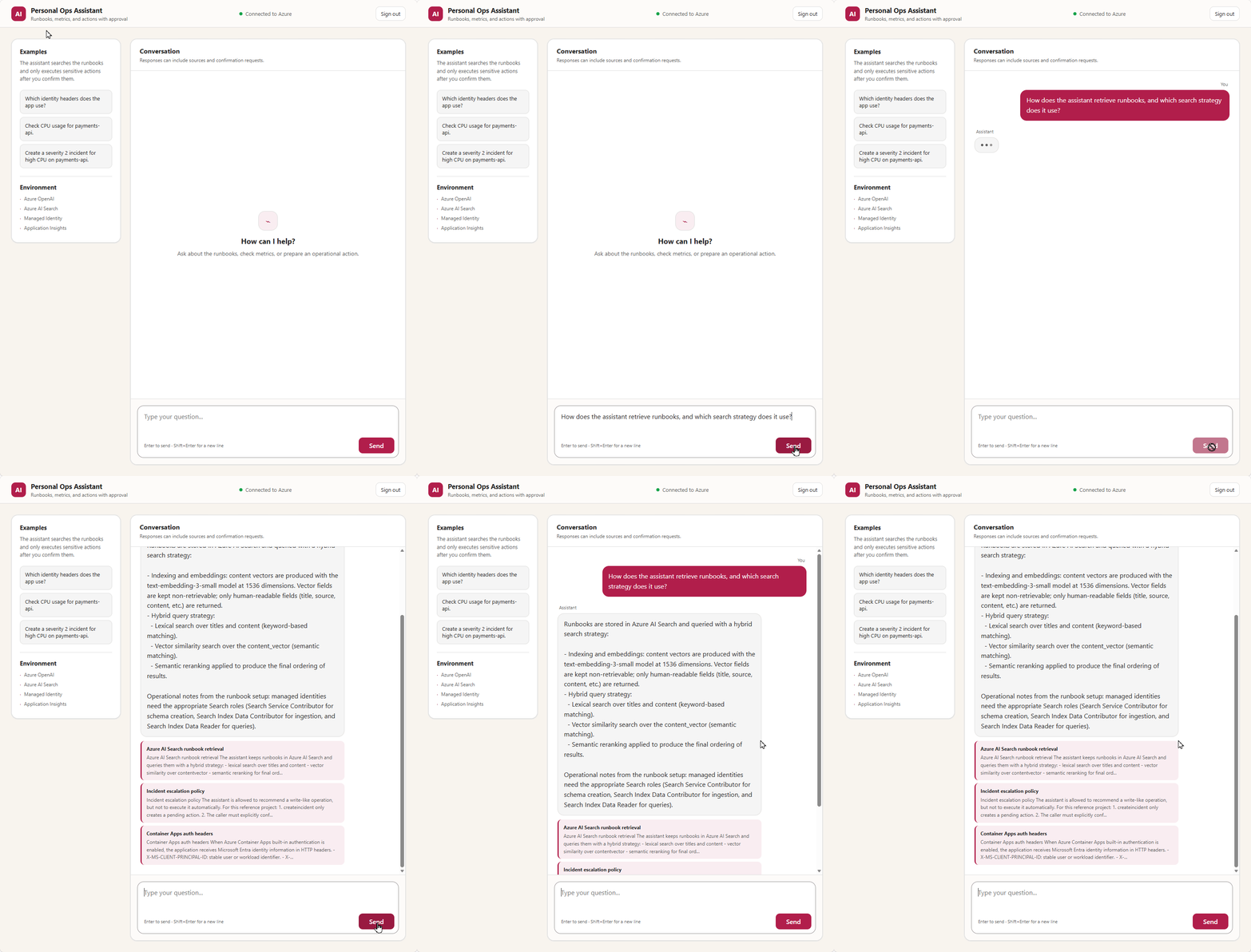
The validated English interface returns a grounded answer and displays the runbooks used as sources.
Repository layout and prerequisites
Current repository structure:
labs/personal-assistant/
├── docs/runbooks/
├── infra/
│   ├── app.bicep
│   ├── main.bicep
│   └── main.parameters.json
├── src/personal_assistant/
│   ├── actions.py
│   ├── agent.py
│   ├── app.py
│   ├── audit.py
│   ├── bootstrap.py
│   ├── config.py
│   ├── identity.py
│   ├── incidents.py
│   ├── llm.py
│   ├── memory.py
│   ├── models.py
│   ├── observability.py
│   ├── rag.py
│   └── tools.py
├── tests/
├── .env.example
├── azure.yaml
├── Dockerfile
└── pyproject.toml
The project requires Python 3.12. For the Azure deployment, install:
- Git;
- Azure CLI;
- Azure Developer CLI;
- permission to create resources and role assignments in the target subscription;
- quota for the chat and embedding model deployments in the selected region.
Local Docker is optional. azure.yaml sets remoteBuild: true, so Azure Container Registry builds the image for the Azure deployment.
1. Run the fake mode before creating Azure resources
Local mode runs the same API, agent loop, tool registry, approval service, and memory interfaces as Azure mode. Only the model and retrieval adapters change.
On Windows PowerShell:
PowerShell: run:
git clone https://github.com/ricmmartins/agentic-infra-handbook.git
Set-Location agentic-infra-handbook\labs\personal-assistant

$labRoot = (Get-Location).Path
if (-not (Test-Path .\azure.yaml) -or -not (Test-Path .\pyproject.toml)) {
  throw "Run this tutorial from the agentic-infra-handbook\labs\personal-assistant directory."
}

Copy-Item .env.example .env
py -3.12 -m venv .venv
.\.venv\Scripts\Activate.ps1
python -m pip install --upgrade pip
pip install -e ".[dev]"
The relevant defaults in .env.example are:
Excerpt from the existing code, shown for reference:
APP_ENV=development
APP_HOST=127.0.0.1
APP_PORT=8000
MODEL_BACKEND=fake
RAG_BACKEND=local
MEMORY_BACKEND=in_memory
LOCAL_DEV_USER_ID=00000000-0000-0000-0000-000000000001
LOCAL_DEV_USER_NAME=ricardo@example.local
These values prevent the application from reaching Azure. The chat model behaves deterministically, RAG reads docs/runbooks, metrics derive from a stable hash of the resource name, and the local identity is fixed. A request for the same resource therefore returns the same test data.
Start the API:
PowerShell: run:
personal-assistant-api
Open a second PowerShell window, activate the virtual environment there, and send a request:
PowerShell: run:
Invoke-RestMethod `
  -Method Post `
  -Uri http://127.0.0.1:8000/chat `
  -ContentType 'application/json' `
  -Body '{"session_id":"demo-1","message":"Which identity headers does the app read in Azure?"}'
Expected output: the response contains an answer, citations, and, when a sensitive operation is requested, a pending_action.
Run the test suite before changing any cloud setting:
PowerShell: run:
pytest -q
The current lab has 14 test functions. They verify:
- chat answers include citations;
- the root route serves the authenticated browser UI;
/mereturns the authenticated actor;- confirmation must be explicit;
- no incident is created before confirmation;
- only the requesting actor can confirm;
- the Search index contains the expected semantic fields and
en.microsoftanalyzer; - an HTTP
207ingestion response with a failed document is rejected; - Azure mode refuses incomplete configuration;
- tool arguments are validated before an action is created;
- concurrent and repeated confirmation remains idempotent;
- Azure mode accepts only a consistent canonical Easy Auth principal envelope;
- partial or inconsistent authentication headers are rejected;
- audit telemetry omits user-controlled and identifying details.
The ownership test matters more than the UUID used for action_id. A hard-to-guess identifier does not provide authorization.
2. Make credential selection deterministic
DefaultAzureCredential is convenient on a development machine because it can reuse the Azure CLI session. In a Container App, I prefer an explicit managed identity credential.
Excerpt from the existing code, shown for reference:
from azure.identity import DefaultAzureCredential, ManagedIdentityCredential


def build_token_credential(config):
    if config.is_development:
        return DefaultAzureCredential()

    return ManagedIdentityCredential(
        client_id=config.managed_identity_client_id
    )
For a system-assigned identity, managed_identity_client_id is empty. If the runtime uses a user-assigned identity, set MANAGED_IDENTITY_CLIENT_ID to that identity’s client ID.
This split keeps production from walking a long credential chain intended for developer workstations. It also makes a missing identity fail where I expect it to fail.
3. Connect Azure OpenAI without an API key
The implementation uses the OpenAI Python client against Azure OpenAI’s v1 base URL:
Excerpt from the existing code, shown for reference:
from azure.identity import get_bearer_token_provider
from openai import OpenAI


token_provider = get_bearer_token_provider(
    build_token_credential(config),
    "https://ai.azure.com/.default",
)

client = OpenAI(
    base_url=f"{config.azure_openai_endpoint.rstrip('/')}/openai/v1/",
    api_key=token_provider,
)
The token provider is passed through the client’s api_key parameter because that parameter accepts a callable. No static OpenAI key is stored in the application.
A precise note about the v1 endpoint and the Responses API
The /openai/v1/ base URL is Azure OpenAI’s v1 API surface. That name is sometimes confused with the OpenAI Responses API. They are not the same thing.
The companion revision used for this tutorial calls client.chat.completions.create() for chat and tool calls:
Excerpt from the existing code, shown for reference:
response = client.chat.completions.create(
    model=config.azure_openai_chat_deployment,
    messages=messages,
    tools=tools,
    tool_choice="auto",
)
So this implementation uses the Azure OpenAI v1 endpoint, but its agent adapter uses the Chat Completions operation, not client.responses.create(). I make the distinction because this snippet is not Responses API code. The ChatModel protocol isolates this choice, so a later Responses API adapter can replace it without changing retrieval, approvals, or the FastAPI routes.
In both APIs, the value supplied as model is the Azure deployment name, not necessarily the public model name.
The validated chat deployment is assistant-chat, backed by gpt-5-mini version 2025-08-07. The sample does not send temperature because this model deployment does not accept it in the tested configuration.
Embeddings use text-embedding-3-small with 1536 dimensions:
Excerpt from the existing code, shown for reference:
response = client.embeddings.create(
    model=config.azure_openai_embedding_deployment,
    input=text,
    dimensions=1536,
)
The model can return fewer dimensions than its maximum, but the index definition, ingestion vectors, and query vectors must agree. Treat a dimension change as an index migration.
4. Build the Azure AI Search index
The Azure adapter uses the stable Search REST API version 2026-04-01 and creates the index idempotently. The vector field is:
Excerpt from the existing code, shown for reference:
{
    "name": "content_vector",
    "type": "Collection(Edm.Single)",
    "searchable": True,
    "retrievable": False,
    "stored": False,
    "dimensions": 1536,
    "vectorSearchProfile": "content-vector-profile",
}
The model does not need the vector. Search results select the fields that a response can quote:
Expected output:
id,title,source,content
The full index also defines an HNSW algorithm and a semantic configuration:
Excerpt from the existing code, shown for reference:
"vectorSearch": {
    "algorithms": [{"name": "content-hnsw", "kind": "hnsw"}],
    "profiles": [
        {
            "name": "content-vector-profile",
            "algorithm": "content-hnsw",
        }
    ],
},
"semantic": {
    "configurations": [
        {
            "name": "runbook-semantic",
            "prioritizedFields": {
                "titleField": {"fieldName": "title"},
                "prioritizedContentFields": [{"fieldName": "content"}],
                "prioritizedKeywordsFields": [{"fieldName": "source"}],
            },
        }
    ]
},
The runbooks that ship in docs/runbooks/ are English, so the content field uses en.microsoft. The analyzer choice follows the language of the indexed documents, not the language of the UI or the queries sent against it. If I localized the corpus to another language, the correct fix would be to change the analyzer and rebuild the index, not to leave an English analyzer running against non-English text.
The query combines lexical and vector retrieval, then asks for semantic ranking:
Excerpt from the existing code, shown for reference:
payload = {
    "search": query,
    "queryType": "semantic",
    "semanticConfiguration": "runbook-semantic",
    "select": "id,title,source,content",
    "top": 3,
    "vectorQueries": [
        {
            "kind": "vector",
            "vector": query_vector,
            "fields": "content_vector",
            "k": 50,
            "weight": 2,
        }
    ],
}
Search runs lexical and vector retrieval in parallel, combines the rankings with Reciprocal Rank Fusion, and applies the semantic ranker. top=3 limits the documents sent to the prompt. k=50 gives the reranker a larger vector candidate set.
Validate HTTP 207 at the document level
Azure AI Search can return HTTP 207 Multi-Status when a batch contains a mix of successful and failed document operations. Treating every 2xx response as success would leave the index partially populated.
The adapter parses the response body, collects successful document keys, and rejects failures or missing keys:
Excerpt from the existing code, shown for reference:
indexed_ids = {
    str(result.get("key"))
    for result in results
    if result.get("status") is True and result.get("key")
}

failures = [
    {
        "key": str(result.get("key", "")),
        "statusCode": str(result.get("statusCode", "")),
        "errorMessage": str(result.get("errorMessage", "")),
    }
    for result in results
    if result.get("status") is not True
]

missing_ids = sorted(expected_document_ids - indexed_ids)
if failures or missing_ids:
    raise RuntimeError(
        "Azure AI Search document ingestion was incomplete. "
        f"Failures: {failures}; missing document IDs: {missing_ids}."
    )
One test constructs a 207 response with one valid document and one invalid document, then confirms that bootstrap fails instead of accepting an incomplete knowledge base.
Split ingestion from query permissions in production
I would use separate identities outside this lab:
| Identity | Azure AI Search roles |
|---|---|
| Ingestion pipeline | Search Service Contributor and Search Index Data Contributor |
| Assistant API | Search Index Data Reader |
The API needs to query. The pipeline needs to alter the index and upload documents. Giving the chat runtime both permissions turns an application vulnerability into an unnecessary indexing path.
For the first deployment, BOOTSTRAP_RAG_ON_STARTUP=true keeps setup simple. The Container App therefore receives Search Service Contributor and Search Index Data Contributor. Move ingestion to a job or pipeline, set bootstrap to false, and reduce the API identity to Search Index Data Reader before production.
5. Assemble the agent loop
Each chat request starts with the authenticated actor, the caller’s session_id, and the new message. The memory key includes both actor and session:
Excerpt from the existing code, shown for reference:
memory_session_id = f"{actor.actor_id}:{session_id}"
documents = self.knowledge_base.search(message)
citations = [document.to_citation() for document in documents]
history = self.memory_store.get_history(memory_session_id)
Two people can now choose session_id="demo" without sharing history.
The model gets the system prompt, retrieved runbooks, prior messages, and current user message. The loop allows at most three model rounds:
Excerpt from the existing code, shown for reference:
for _ in range(3):
    turn = self.model.complete(
        messages=messages,
        tools=self.tool_registry.schemas,
    )

    if turn.tool_calls:
        messages.append(turn.as_assistant_message())
        for tool_call in turn.tool_calls:
            result = self.tool_registry.execute(
                session_id=session_id,
                actor=actor,
                tool_name=tool_call.name,
                arguments=tool_call.arguments,
            )
            messages.append(result.as_tool_message(tool_call.id))
        continue

    return ChatResponse(
        answer=turn.content,
        citations=citations,
        pending_action=pending_action,
    )
The actual implementation also catches invalid tool arguments and feeds a structured error back to the model. If no final answer appears after three rounds, it raises an error rather than allowing an unbounded tool loop.
In production I would record the termination reason: final answer, tool error, timeout, or maximum rounds. That is much more useful than a single generic failure count.
6. Treat read and write tools differently
get_resource_metrics is read-only. Its schema limits the window to 5 through 60 minutes:
Excerpt from the existing code, shown for reference:
{
    "type": "function",
    "function": {
        "name": "get_resource_metrics",
        "description": "Return deterministic mock metrics for a named resource.",
        "parameters": {
            "type": "object",
            "properties": {
                "resource_name": {"type": "string"},
                "window_minutes": {
                    "type": "integer",
                    "minimum": 5,
                    "maximum": 60,
                },
            },
            "required": ["resource_name"],
        },
    },
}
The local adapter hashes the resource name and derives stable CPU, memory, and error-rate values. Replacing it with a narrowly scoped Azure Monitor adapter does not require changes to the agent loop.
create_incident takes a different path. A model tool call only creates a pending record:
Excerpt from the existing code, shown for reference:
record = pending_action_service.create_incident_request(
    session_id=session_id,
    actor=actor,
    title=arguments["title"],
    summary=arguments["summary"],
    severity=arguments["severity"],
)
The response gives the user an action_id and preview. The incident adapter has not run.
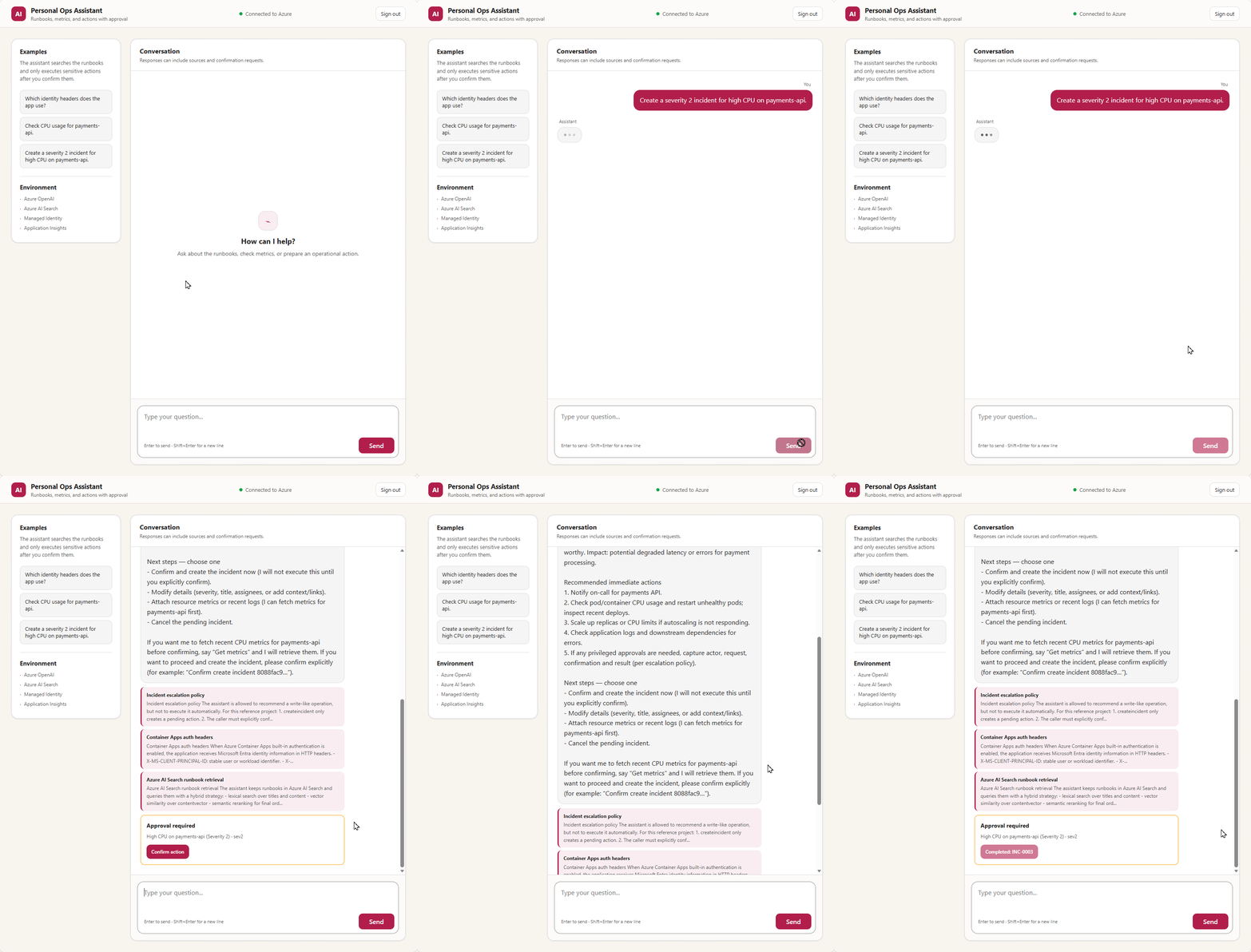
The model prepares a pending action. The backend performs the write only after the requesting user confirms it.
Test the flow locally:
PowerShell: run:
$chat = Invoke-RestMethod `
  -Method Post `
  -Uri http://127.0.0.1:8000/chat `
  -ContentType 'application/json' `
  -Body '{"session_id":"demo-2","message":"Create an incident for high CPU on payments-api"}'

Invoke-RestMethod `
  -Method Post `
  -Uri "http://127.0.0.1:8000/actions/$($chat.pending_action.action_id)/confirm" `
  -ContentType 'application/json' `
  -Body '{"confirm":true}'
The confirmation service checks that:
- confirmation is explicit;
- the action is still pending;
- the authenticated actor owns the request.
The store changes the record from pending to executing while holding a lock. That claim prevents two concurrent confirmations from executing the adapter twice. A completed action returns its saved result, so a retry gets the same incident_id.
Only after a successful claim does the mock adapter create INC-0001. For a real ITSM integration, I would keep this order and add:
- durable pending-action storage;
- the
action_idas an idempotency key; - bounded timeouts and retries;
- stricter ownership, severity, and routing validation;
- an audit sink outside the application process.
7. Use the identity already validated by Container Apps
Azure Container Apps has built-in authentication, commonly called Easy Auth. After Microsoft Entra ID validates the request, the platform injects identity headers such as:
X-MS-CLIENT-PRINCIPAL-ID;X-MS-CLIENT-PRINCIPAL-NAME;- the base64-encoded
X-MS-CLIENT-PRINCIPALclaims envelope.
The API resolves its actor only when the envelope identifies the aad provider and contains the same Microsoft Entra object ID:
Excerpt from the existing code, shown for reference:
actor_id = request.headers.get("X-MS-CLIENT-PRINCIPAL-ID")
actor_name = request.headers.get("X-MS-CLIENT-PRINCIPAL-NAME")
encoded_principal = request.headers.get("X-MS-CLIENT-PRINCIPAL")

if (
    actor_id
    and encoded_principal
    and _is_valid_easy_auth_principal(encoded_principal, actor_id)
):
    return ActorContext(
        actor_id=actor_id,
        actor_name=actor_name or actor_id,
        used_local_fallback=False,
    )
An authenticated principal may not have a user name. The code then uses the principal ID as the actor name. The fixed local identity is allowed only when APP_ENV=development. In any other environment, missing or inconsistent authentication headers return 401.
These headers are not cryptographically signed for application-level validation. This design depends on Container Apps managed ingress and Easy Auth being the only path to port 8000. Do not add another public ingress, sidecar proxy, port mapping, or internal caller that can reach the container while supplying its own X-MS-* headers. If the architecture gains a bypass path, validate Microsoft Entra bearer tokens and claims in the application.
/healthz is intentionally excluded from authentication so Container Apps probes can reach it. The root page, /me, /chat, and /actions/{action_id}/confirm require an authenticated session or valid bearer token.
8. Understand the Bicep deployment
infra/main.bicep runs at subscription scope, creates an isolated resource group, and calls infra/app.bicep. The module provisions:
- Log Analytics and Application Insights;
- Azure Container Registry Basic with the admin user disabled;
- a user-assigned identity for image pull;
- Azure OpenAI with
gpt-5-miniandtext-embedding-3-small; - Azure AI Search Basic with local key authentication disabled;
- a Container Apps environment;
- a Container App with a system-assigned runtime identity;
- ACR, OpenAI, and Search role assignments;
- Microsoft Entra authentication for the Container App;
- startup, liveness, and readiness probes.
Search has a separate region parameter. In the environment I used to validate the tutorial, East US 2 did not have capacity for another Basic Search service. Keeping the application in East US 2 and placing Search in East US solved that specific capacity problem. Use one region when capacity allows.
The tested deployments are:
| Purpose | Deployment | Model |
|---|---|---|
| Chat and tools | assistant-chat | gpt-5-mini, version 2025-08-07 |
| Embeddings | assistant-embedding | text-embedding-3-small, version 1, 1536 dimensions |
Model versions and regional quota change. Check both before deployment. If your subscription cannot create these versions, update the Bicep and rerun the tests rather than changing only the portal deployment.
The Bicep fixes minReplicas and maxReplicas at one. Session history and pending actions still live in memory, so two replicas could create an action on one process and send its confirmation to another. Shared state comes before horizontal scaling.
9. Select the tenant, subscription, regions, models, and allowed users
Use PowerShell 7.4 or newer. The companion lab pins the minimum tested tool versions and includes a preflight helper. Verify the local tools before contacting Azure.
PowerShell: run:
$PSVersionTable.PSVersion
py -3.12 --version
az version
az bicep version
azd version

.\scripts\preflight.ps1 -LocalOnly
Expected output: each tool reports a supported version and the preflight ends successfully. The helper fails rather than guessing when a prerequisite is missing or too old.
Set explicit values for the deployment. Model availability, versions, SKU names, capacity, and quota vary by region and subscription.
PowerShell: run:
$tenantId = "<tenant-guid>"
$subscriptionId = "<subscription-guid>"
$location = "<azure-openai-and-container-apps-region>"
$searchLocation = "<azure-ai-search-region>"

$chatModelName = "gpt-5-mini"
$chatModelVersion = "2025-08-07"
$chatDeploymentSku = "GlobalStandard"
$chatDeploymentCapacity = 10

$embeddingModelName = "text-embedding-3-small"
$embeddingModelVersion = "1"
$embeddingDeploymentSku = "GlobalStandard"
$embeddingDeploymentCapacity = 10
$embeddingDimensions = 1536

az login --tenant $tenantId
az account set --subscription $subscriptionId
azd auth login
azd auth status

$signedInObjectId = az ad signed-in-user show --query id --output tsv
if ($LASTEXITCODE -ne 0 -or [string]::IsNullOrWhiteSpace($signedInObjectId)) {
  throw "Could not resolve the signed-in Microsoft Entra user object ID."
}

$authAllowedPrincipalIds = @($signedInObjectId)
$authAllowedGroupIds = @()

az account show `
  --query "{name:name,id:id,tenantId:tenantId}" `
  --output table

az cognitiveservices model list `
  --location $location `
  --query "[?model.name=='$chatModelName' || model.name=='$embeddingModelName'].{name:model.name,version:model.version,format:model.format,skus:skus[].name}" `
  --output table

az cognitiveservices usage list `
  --location $location `
  --output table
Expected output: the active tenant and subscription are the intended targets, both exact model versions and deployment SKUs appear in the live catalog, and available quota covers the requested capacities. Change the variables before provisioning if the live output differs.
The current lab fails closed for interactive access. AUTH_ALLOWED_PRINCIPAL_IDS must include the operator’s Microsoft Entra user object ID. Add only approved user object IDs or security-group object IDs. Do not put tenant IDs, application client IDs, UPNs, or group names in these lists.
Optional: PowerShell, only when granting access to another approved user or group:
$approvedUserId = az ad user show `
  --id "<approved-user-upn-or-object-id>" `
  --query id `
  --output tsv
$approvedGroupId = az ad group show `
  --group "<approved-group-name-or-object-id>" `
  --query id `
  --output tsv

$authAllowedPrincipalIds += $approvedUserId
$authAllowedGroupIds += $approvedGroupId
Register the resource providers required by the supplied Bicep.
PowerShell: run:
$providers = @(
  "Microsoft.App",
  "Microsoft.ContainerRegistry",
  "Microsoft.CognitiveServices",
  "Microsoft.Insights",
  "Microsoft.ManagedIdentity",
  "Microsoft.OperationalInsights",
  "Microsoft.Search"
)

foreach ($provider in $providers) {
  az provider register --namespace $provider --wait
  if ($LASTEXITCODE -ne 0) {
    throw "Provider registration failed: $provider"
  }
}
10. Create the Microsoft Entra application and credential
Bicep configures Container Apps built-in authentication, but it expects an existing single-tenant App Registration. Run steps 9 through 12 in the same PowerShell session because later commands use the variables created here.
PowerShell: run:
$app = az ad app create `
  --display-name "personal-assistant-reference" `
  --sign-in-audience "AzureADMyOrg" `
  --output json | ConvertFrom-Json
if ($LASTEXITCODE -ne 0 -or -not $app.appId -or -not $app.id) {
  throw "App Registration creation failed."
}

$clientId = $app.appId
$scopeId = [guid]::NewGuid().Guid

$graphBody = @{
  identifierUris = @("api://$clientId")
  groupMembershipClaims = "SecurityGroup"
  api = @{
    requestedAccessTokenVersion = 2
    oauth2PermissionScopes = @(
      @{
        adminConsentDescription = "Access the personal assistant API"
        adminConsentDisplayName = "Access the personal assistant API"
        id = $scopeId
        isEnabled = $true
        type = "User"
        userConsentDescription = "Access the personal assistant API"
        userConsentDisplayName = "Access the personal assistant API"
        value = "user_impersonation"
      }
    )
  }
  web = @{
    implicitGrantSettings = @{
      enableIdTokenIssuance = $true
      enableAccessTokenIssuance = $false
    }
  }
} | ConvertTo-Json -Depth 8 -Compress

$graphToken = az account get-access-token `
  --resource-type ms-graph `
  --query accessToken `
  --output tsv
if ($LASTEXITCODE -ne 0 -or [string]::IsNullOrWhiteSpace($graphToken)) {
  throw "Could not obtain a Microsoft Graph token."
}

Invoke-RestMethod `
  -Method Patch `
  -Uri "https://graph.microsoft.com/v1.0/applications/$($app.id)" `
  -Headers @{ Authorization = "Bearer $graphToken" } `
  -ContentType "application/json" `
  -Body $graphBody | Out-Null

$graphToken = $null

az ad sp create --id $clientId --output none
if ($LASTEXITCODE -ne 0) {
  throw "Could not create the Enterprise Application."
}
The delegated scope is api://<client-id>/user_impersonation. ID-token issuance supports the Easy Auth browser flow, and SecurityGroup claims support the optional group allowlist. The lab does not require broad Microsoft Graph application permissions.
Create a short-lived credential for the authentication provider. Its password is returned only once.
PowerShell: run:
$credentialEnd = (Get-Date).ToUniversalTime().AddDays(30).ToString(
  "yyyy-MM-ddTHH:mm:ssZ"
)

$credential = az ad app credential reset `
  --id $clientId `
  --append `
  --display-name "container-app-easy-auth" `
  --end-date $credentialEnd `
  --output json | ConvertFrom-Json
if ($LASTEXITCODE -ne 0 -or [string]::IsNullOrWhiteSpace($credential.password)) {
  throw "App credential creation failed."
}

$clientSecret = $credential.password
Do not print $clientSecret, paste it into chat, commit it, or include it in screenshots or logs.
11. Create and validate the AZD environment
Create one isolated AZD environment and set every Bicep input used by the current lab.
PowerShell: run:
$environmentName = "personal-assistant-dev"

azd env new $environmentName
azd env set AZURE_SUBSCRIPTION_ID $subscriptionId
azd env set AZURE_LOCATION $location
azd env set AZURE_SEARCH_LOCATION $searchLocation
azd env set AUTH_CLIENT_ID $clientId
azd env set AUTH_CLIENT_SECRET $clientSecret
azd env set AUTH_ALLOWED_PRINCIPAL_IDS ($authAllowedPrincipalIds -join ",")
azd env set AUTH_ALLOWED_GROUP_IDS ($authAllowedGroupIds -join ",")

azd env set AZURE_OPENAI_CHAT_MODEL_NAME $chatModelName
azd env set AZURE_OPENAI_CHAT_MODEL_VERSION $chatModelVersion
azd env set AZURE_OPENAI_CHAT_DEPLOYMENT_SKU $chatDeploymentSku
azd env set AZURE_OPENAI_CHAT_DEPLOYMENT_CAPACITY $chatDeploymentCapacity
azd env set AZURE_OPENAI_EMBEDDING_MODEL_NAME $embeddingModelName
azd env set AZURE_OPENAI_EMBEDDING_MODEL_VERSION $embeddingModelVersion
azd env set AZURE_OPENAI_EMBEDDING_DEPLOYMENT_SKU $embeddingDeploymentSku
azd env set AZURE_OPENAI_EMBEDDING_DEPLOYMENT_CAPACITY $embeddingDeploymentCapacity
azd env set AZURE_OPENAI_EMBEDDING_DIMENSIONS $embeddingDimensions

$clientSecret = $null
$credential.password = $null
This dependency-free path writes AUTH_CLIENT_SECRET as plaintext in .azure\<environment>\.env. The directory is ignored by Git, but ignore rules are not encryption. Do not clear the AZD value yet: azd up still needs it to configure Easy Auth.
Optional: PowerShell, only when an organization-approved Key Vault is already available:
azd env set-secret AUTH_CLIENT_SECRET
This interactive alternative stores a Key Vault reference in the AZD environment. Record the non-secret vault and secret names for cleanup.
Run the companion lab’s Azure-aware helper. It performs read-only checks against the tenant, subscription, provider registrations, App Registration, model catalog, RBAC, allowlists, and AZD environment.
PowerShell: run:
.\scripts\preflight.ps1 `
  -TenantId $tenantId `
  -SubscriptionId $subscriptionId `
  -ClientId $clientId `
  -AllowedPrincipalIds $authAllowedPrincipalIds `
  -AllowedGroupIds $authAllowedGroupIds `
  -Location $location `
  -SearchLocation $searchLocation `
  -ChatModelName $chatModelName `
  -ChatModelVersion $chatModelVersion `
  -ChatDeploymentSku $chatDeploymentSku `
  -ChatDeploymentCapacity $chatDeploymentCapacity `
  -EmbeddingModelName $embeddingModelName `
  -EmbeddingModelVersion $embeddingModelVersion `
  -EmbeddingDeploymentSku $embeddingDeploymentSku `
  -EmbeddingDeploymentCapacity $embeddingDeploymentCapacity `
  -EmbeddingDimensions $embeddingDimensions
Expected output: the helper completes without an error. If access comes only through a group or custom role, have an administrator verify Microsoft.Authorization/roleAssignments/write; then use the README-documented -SkipRoleAssignmentCheck override.
12. Compile, test, preview, and deploy
The first block is static/local. The preview contacts Azure but does not intentionally create resources.
PowerShell: run:
az bicep build --file .\infra\main.bicep --stdout | Out-Null
if ($LASTEXITCODE -ne 0) { throw "Bicep build failed." }

python -m pytest -q
if ($LASTEXITCODE -ne 0) { throw "Python tests failed." }

azd provision --preview --no-prompt
if ($LASTEXITCODE -ne 0) { throw "AZD deployment preview failed." }
Expected output: Bicep compiles, the Python tests pass, and the AZD preview succeeds. Preview cannot reserve Azure AI Search capacity or Azure OpenAI quota, so a later deployment can still fail because availability changed.
Skip azd package for this lab. Packaging a Docker service is a local Docker operation. The checked-in azure.yaml intentionally sets remoteBuild: true, and azd up sends the source to ACR.
PowerShell: run; this creates billable Azure resources:
azd up
if ($LASTEXITCODE -ne 0) {
  throw "azd up failed. Use the companion README diagnostics before retrying."
}
Expected output: AZD creates the resource group, provisions Bicep resources and role assignments, builds the image remotely in ACR, deploys the Container App, and saves API_URL.
Only after azd up succeeds can you register the final callback and remove the plaintext AZD secret.
PowerShell: run:
$appUrl = azd env get-value API_URL
if ($LASTEXITCODE -ne 0 -or [string]::IsNullOrWhiteSpace($appUrl)) {
  throw "AZD did not return API_URL."
}
$clientId = azd env get-value AUTH_CLIENT_ID
if ($LASTEXITCODE -ne 0 -or [string]::IsNullOrWhiteSpace($clientId)) {
  throw "AZD did not return AUTH_CLIENT_ID."
}

$redirectUri = "$($appUrl.TrimEnd('/'))/.auth/login/aad/callback"
az ad app update `
  --id $clientId `
  --web-redirect-uris $redirectUri
if ($LASTEXITCODE -ne 0) {
  throw "Could not register the Easy Auth callback."
}

azd env set AUTH_CLIENT_SECRET ""
The minimum tested AZD version has no env unset, so an empty value is intentional. Before another azd provision or azd up, create a fresh App Registration credential, set it, provision, and clear it again. If you used azd env set-secret, retain the Key Vault reference instead of replacing it with an empty value.
PowerShell: run only for a later code-only change with unchanged infrastructure:
azd deploy api
if ($LASTEXITCODE -ne 0) {
  throw "Code-only deployment failed."
}
At startup, the lab creates the Search index and ingests /app/docs/runbooks. The first startup can take time while embeddings are created and role assignments propagate.
13. Validate health, authentication, browser behavior, and telemetry
The lab includes a smoke-test helper for the public boundary.
PowerShell: run:
$appUrl = azd env get-value API_URL
if ($LASTEXITCODE -ne 0 -or [string]::IsNullOrWhiteSpace($appUrl)) {
  throw "AZD did not return API_URL."
}

.\scripts\smoke-test.ps1 `
  -AppUrl $appUrl `
  -OpenBrowser
Expected output: anonymous /healthz returns 200 with {"status":"ok"}, and anonymous /me returns 302 to Easy Auth/Microsoft Entra. A public 401 still rejects data access, but it means the configured browser redirect is not working.
After sign-in, open the browser developer console. The next block is JavaScript for that console, not PowerShell and not source code to add to the application.
Execute: browser developer console (JavaScript):
window.validation = {
  sessionId: crypto.randomUUID(),
  async chat(message) {
    const response = await fetch("/chat", {
      method: "POST",
      headers: { "Content-Type": "application/json" },
      body: JSON.stringify({ session_id: this.sessionId, message })
    });
    if (!response.ok) throw new Error(`${response.status}: ${await response.text()}`);
    return response.json();
  },
  async confirm(actionId) {
    const response = await fetch(`/actions/${encodeURIComponent(actionId)}/confirm`, {
      method: "POST",
      headers: { "Content-Type": "application/json" },
      body: JSON.stringify({ confirm: true })
    });
    return { status: response.status, body: await response.json() };
  }
};

validation.me = await fetch("/me").then(response => response.json());
validation.runbook = await validation.chat(
  "Which identity headers does the Azure app trust?"
);
validation.metrics = await validation.chat(
  "Show CPU metrics for payments-api"
);
validation.incident = await validation.chat(
  "Create an incident for high CPU on payments-api"
);

console.assert(validation.runbook.citations.length > 0, "Expected citations.");
console.assert(
  validation.metrics.pending_action === null,
  "A read-only metrics request created an action."
);
console.assert(
  validation.incident.pending_action?.status === "pending",
  "Expected a pending action."
);
validation.actionId = validation.incident.pending_action.action_id;
Expected output: /me identifies the signed-in Microsoft Entra object ID, retrieval has citations, metrics creates no pending action, and the incident request is pending with no incident_id.
Use the full companion README validation sequence to prove the second approved actor receives the application’s ownership-specific 403, then confirm twice as the original actor and verify the same incident_id.
Application Insights KQL runs in Logs for the deployed Application Insights resource. It is not PowerShell and must not be pasted into the browser console.
Execute: Application Insights Logs (KQL):
dependencies
| where name in ("chat.request", "rag.search", "tool.execute")
| summarize calls=count(), failures=countif(success == false) by name
| order by failures desc
Execute: Application Insights Logs (KQL):
traces
| where message startswith "audit_event=pending_action"
| project timestamp, message
| order by timestamp desc
Expected output: telemetry includes chat.request, rag.search, tool.execute, and pending-action audit events after ingestion delay. Audit messages contain event type, actor_ref, and action_id, not prompts, incident details, session IDs, actor names/object IDs, tokens, or secrets.
14. Check RBAC and keyless authentication
The system-assigned Container App identity receives:
| Resource | Role |
|---|---|
| Azure OpenAI | Cognitive Services OpenAI User |
| Azure AI Search | Search Service Contributor |
| Azure AI Search | Search Index Data Contributor |
The user-assigned pull identity receives AcrPull. ACR has its admin user disabled. Azure AI Search and Azure OpenAI disable local authentication, so no service API key is stored in the code or Container App environment.
Expected configuration:
allowedAudiences:
  <client-id>
  api://<client-id>
allowedApplications:
  <client-id>
allowedPrincipals:
  <approved user and group object IDs>
These are separate controls: audiences validate aud, applications validate the calling client, and principals restrict interactive users/groups. The Easy Auth provider secret still needs rotation.
15. Keep the production boundary explicit
Production guidance: the current code is intentionally not production-ready:
- move Search schema creation and ingestion to a separate job or pipeline;
- reduce the API identity to Search Index Data Reader;
- persist conversation and pending-action state before using more than one replica;
- add document-level authorization, private networking where required, rate limits, retrieval evaluations, durable action expiry/cancellation, and CSRF protection;
- replace the mock metrics and incident adapters only after authorization, idempotency, audit, and rollback behavior are production-ready.
The Application Insights setup is existing application code, not a command:
Excerpt from the existing code, shown for reference:
from azure.monitor.opentelemetry import configure_azure_monitor


if config.applicationinsights_connection_string:
    configure_azure_monitor(
        connection_string=config.applicationinsights_connection_string
    )
Where Redis and Cosmos DB fit
Azure Cache for Redis is being retired. For a new implementation, plan for Azure Managed Redis.
Azure Managed Redis uses Microsoft Entra ID by default. Its token scope is:
Production configuration reference:
https://redis.azure.com/.default
The client uses the managed identity object ID as the user name and an access token as the password. That token expires. A production client has to renew it and deal with pooled connections rather than obtaining one token at startup and keeping it forever.
The agent already depends on a protocol:
Excerpt from the existing code, shown for reference:
class ConversationMemoryStore(Protocol):
    def append(
        self,
        session_id: str,
        role: str,
        content: str,
    ) -> None: ...

    def get_history(
        self,
        session_id: str,
    ) -> list[dict[str, str]]: ...
An Azure Managed Redis implementation can replace the in-memory store without changing the agent. Pending actions also need shared, durable storage before scaling to more than one replica.
Cosmos DB vector search is a reasonable option for long-term memory, but the container design needs explicit decisions:
- partition key;
- vector policy;
- embedding dimensions;
- vector index type;
- time to live and deletion policy;
- consent for storing preferences;
- user or tenant isolation.
Vector policies and vector indexes cannot be changed in place after a Cosmos DB container is created. Decide them before loading data. I would add long-term memory only after measuring which facts users retrieve often enough to justify storing.
Changes I would make before production
This slice proves the boundaries, not production readiness. My next changes would be:
- persist conversations and pending actions outside the process;
- move Search ingestion to a separate job or pipeline;
- enforce document-level access control in Search;
- replace mock metrics with a tightly scoped Azure Monitor adapter;
- connect an ITSM system with durable idempotency;
- add private endpoints where network isolation requires them;
- add retrieval, groundedness, and tool-selection evaluations;
- define per-user retention and deletion for memory;
- apply rate limits by authenticated identity;
- rotate the Easy Auth credential automatically.
I want a precise list of what remains. Three successful chat answers do not make a system production ready.
Clean up
Cleanup is destructive. Preserve the AZD environment until the Azure and Microsoft Entra objects are gone because it contains the identifiers needed for recovery.
Cleanup: PowerShell; inspect and capture targets before deleting anything:
$labRoot = (Get-Location).Path
if (-not (Test-Path .\azure.yaml) -or -not (Test-Path .\pyproject.toml)) {
  throw "Run cleanup from the personal-assistant lab directory."
}

$environmentName = azd env get-value AZURE_ENV_NAME
$resourceGroup = azd env get-value AZURE_RESOURCE_GROUP
$clientId = azd env get-value AUTH_CLIENT_ID
if (
  [string]::IsNullOrWhiteSpace($environmentName) -or
  [string]::IsNullOrWhiteSpace($resourceGroup) -or
  [string]::IsNullOrWhiteSpace($clientId)
) {
  throw "AZD cleanup identifiers are incomplete."
}

$openAIAccount = az cognitiveservices account list `
  --resource-group $resourceGroup `
  --query "[?kind=='OpenAI'] | [0].{name:name,location:location}" `
  --output json | ConvertFrom-Json
if ($LASTEXITCODE -ne 0) {
  throw "Could not inspect the Azure OpenAI account before cleanup."
}

az resource list `
  --resource-group $resourceGroup `
  --output table

az ad app show `
  --id $clientId `
  --query "{displayName:displayName,appId:appId}" `
  --output table
Expected output: the resource table and App Registration are exactly the lab targets. Stop if the resource group contains anything that must be retained.
Use AZD’s cleanup path first.
Cleanup: PowerShell; deletes the AZD deployment:
azd down --purge
if ($LASTEXITCODE -ne 0) {
  throw "Azure cleanup failed; do not remove local state. Use the reviewed fallback only when AZD cannot locate its deployment."
}
If azd down specifically cannot locate its deployment, use the resource group and Azure OpenAI identity already reviewed above.
Cleanup: PowerShell; fallback only after the primary cleanup cannot locate the deployment:
az group delete --name $resourceGroup --yes
if ($LASTEXITCODE -ne 0) {
  throw "Manual resource-group cleanup failed."
}

if ($openAIAccount.name) {
  az cognitiveservices account purge `
    --name $openAIAccount.name `
    --location $openAIAccount.location `
    --resource-group $resourceGroup `
    --output none
  if ($LASTEXITCODE -ne 0) {
    throw "The resource group was deleted, but the soft-deleted Azure OpenAI account was not purged."
  }
}
After either Azure cleanup path succeeds, remove the named Easy Auth credentials, App Registration, and any remaining Enterprise Application.
Cleanup: PowerShell; deletes Microsoft Entra objects:
$credentialKeyIds = @(
  az ad app credential list `
    --id $clientId `
    --query "[?displayName=='container-app-easy-auth'].keyId" `
    --output tsv
)
if ($LASTEXITCODE -ne 0) {
  throw "Could not enumerate the Easy Auth credentials."
}
foreach ($keyId in $credentialKeyIds) {
  if (-not [string]::IsNullOrWhiteSpace($keyId)) {
    az ad app credential delete --id $clientId --key-id $keyId
    if ($LASTEXITCODE -ne 0) {
      throw "Could not delete Easy Auth credential $keyId."
    }
  }
}

az ad app delete --id $clientId
if ($LASTEXITCODE -ne 0) {
  throw "The Azure resources were removed, but App Registration cleanup failed."
}

$remainingServicePrincipalIds = @(
  az ad sp list `
    --filter "appId eq '$clientId'" `
    --query "[].id" `
    --output tsv
)
foreach ($servicePrincipalId in $remainingServicePrincipalIds) {
  if (-not [string]::IsNullOrWhiteSpace($servicePrincipalId)) {
    az ad sp delete --id $servicePrincipalId
    if ($LASTEXITCODE -ne 0) {
      throw "Could not delete Enterprise Application $servicePrincipalId."
    }
  }
}

$remainingApps = az ad app list `
  --filter "appId eq '$clientId'" `
  --query "length(@)" `
  --output tsv
$remainingServicePrincipals = az ad sp list `
  --filter "appId eq '$clientId'" `
  --query "length(@)" `
  --output tsv
if ($remainingApps -ne "0" -or $remainingServicePrincipals -ne "0") {
  throw "App Registration or Enterprise Application cleanup is incomplete."
}
Optional cleanup: PowerShell, only if azd env set-secret used an existing Key Vault:
az keyvault secret delete `
  --vault-name "<key-vault-name>" `
  --name "<secret-name>" `
  --output none
if ($LASTEXITCODE -ne 0) {
  throw "Key Vault secret cleanup failed."
}
Finally remove only this lab’s generated local state.
Cleanup: PowerShell; run only after Azure and Microsoft Entra cleanup succeeds:
$localAzdEnvironment = Join-Path $labRoot ".azure\$environmentName"

if (Test-Path $localAzdEnvironment) {
  Remove-Item -LiteralPath $localAzdEnvironment -Recurse -Force
}
if (Test-Path (Join-Path $labRoot ".env")) {
  Remove-Item -LiteralPath (Join-Path $labRoot ".env") -Force
}
if (Test-Path (Join-Path $labRoot ".venv")) {
  Remove-Item -LiteralPath (Join-Path $labRoot ".venv") -Recurse -Force
}

$credential = $null
$clientSecret = $null
$graphToken = $null
References
- Companion personal assistant implementation
- Lab README: deploy to Azure step by step
- Azure OpenAI with Microsoft Entra ID
- Azure OpenAI v1 API
- Responses API
- Deploy Container Apps with Azure Developer CLI
- Create a vector index in Azure AI Search
- Hybrid search in Azure AI Search
- Semantic ranking in Azure AI Search
- Azure AI Search roles
- Managed identities in Azure Container Apps
- Container Apps authentication with Microsoft Entra ID
- Pull from ACR with managed identity
- Azure Managed Redis
- Microsoft Entra authentication for Azure Managed Redis
- Vector search in Azure Cosmos DB
- OpenTelemetry in Application Insights