From reactive firefighting to proactive operations: custom skills for Azure SRE Agent
TL;DR: Azure SRE Agent is great at reactive incident response, but doesn’t cover proactive operations out of the box. I built an open-source pack of 8 custom skills that add governance audits, FinOps reporting, capacity planning, postmortems, and more. Combined with Scheduled Investigations, they move your operations from reactive to proactive.
How a customer conversation revealed the gap between what Azure SRE Agent does out of the box, and what production teams actually need.
The conversation that started it all
Prerequisites: You need an active Azure SRE Agent deployment. If you don’t have one yet, the setup takes about 15 minutes.
A few weeks ago, I sat down with an engineering team that had never heard of Azure SRE Agent. They were running a growing SaaS platform on Azure, handling incidents manually, and burning engineering hours on repetitive diagnostics. The classic “we don’t have an SRE team, but we need SRE outcomes” situation.
I walked them through what Azure SRE Agent brings to the table: AI-powered incident investigation, automated root cause analysis, 40+ MCP connectors, sandboxed code execution, memory across investigations. Their reaction was immediate: “This solves our reactive problem. But what about the proactive stuff?”
That question stuck with me. Because they were right.
Azure SRE Agent: what it is (and what it isn’t)
For those unfamiliar: Azure SRE Agent is Microsoft’s AI-powered site reliability agent, generally available since March 2026. Internally at Microsoft, over 1,300 SRE Agents are running in production, handling 35,000+ incidents per month and saving 20,000+ engineering hours monthly.
Here’s what it excels at:
- Reactive incident response: an alert fires, the agent investigates, correlates telemetry, identifies root cause, and either resolves or escalates with full context.
- Diagnostics automation: KQL queries, resource health checks, dependency mapping, all executed in a sandboxed environment.
- Memory and learning: each investigation builds organizational knowledge. The agent remembers past incidents and applies that context to new ones.
- Integrations: PagerDuty, ServiceNow, Teams, GitHub (including Bring Your Own GitHub App since June 2026), Azure Monitor, and custom APIs via plugins.
What it doesn’t do out of the box:
- Run proactive governance audits
- Track cost optimization opportunities on a schedule
- Assess architecture quality against Well-Architected Framework
- Generate capacity forecasts before you hit quota limits
- Produce blameless postmortems with structured 5-Whys analysis
- Monitor your Defender Secure Score and suggest improvements
- Evaluate whether your AI/OpenAI workloads are production-ready
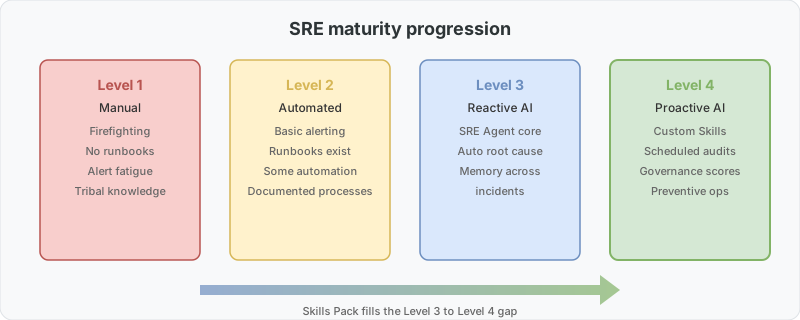
That gap between reactive excellence and proactive operations is exactly what I built the Skills Pack to fill.
Custom skills: the extensibility model
Since June 2026, Azure SRE Agent supports Custom Skills and Plugins. A skill is a structured prompt with instructions, context, and output format that the agent executes using its full toolkit (Azure Resource Graph, KQL, ARM APIs, Cost Management APIs, etc.).
Think of it this way:
- The agent provides the reasoning engine and tool access
- A skill provides the domain knowledge and methodology
You write a SKILL.md file describing what to check, how to score findings, and what format to report in. The agent handles execution, data gathering, correlation, and output generation. No SDK, no compiled code, no deployment pipeline. Just structured instructions in Markdown.
The proactive operations skills pack
I created 8 custom skills that transform Azure SRE Agent from a reactive incident responder into a proactive operations partner:
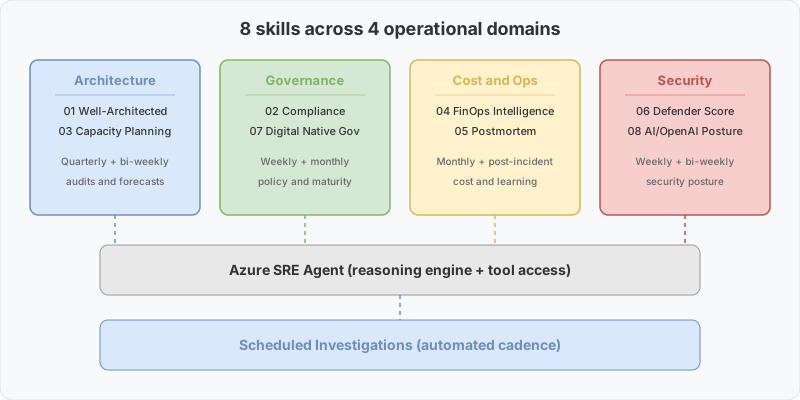
The skills at a glance
| # | Skill | What it does | When to run |
|---|---|---|---|
| 01 | Well-Architected Review | 5-pillar WAF assessment with maturity scoring | Before production launches, quarterly |
| 02 | Compliance and Governance | Policy, RBAC, tagging, locks, naming audit | Weekly |
| 03 | Capacity Planning | Quota utilization, growth projection, scaling prep | Bi-weekly |
| 04 | FinOps Intelligence | Cost optimization + team chargeback in one report | Monthly |
| 05 | Incident Postmortem | Blameless postmortem generator with 5-Whys | After every SEV1/SEV2 |
| 06 | Defender Secure Score | Score monitoring + prioritized improvement plan | Weekly |
| 07 | Digital Native Governance | Startup governance maturity (15 checks, scored 0-100) | Monthly |
| 08 | AI Foundry and OpenAI Posture | Security, reliability and cost posture for AI workloads | Bi-weekly |
Skill 08 pairs well with the architecture patterns in my companion post: Azure AI Foundry: from zero to production. If you’re running Foundry workloads, that guide covers APIM as AI Gateway, spillover architecture, and the production checklist that this skill audits against.
How they differ from Azure Advisor
This is the most common question I get:
| Azure Advisor | SRE Agent Skills | |
|---|---|---|
| Output | Flat list of per-resource recommendations | Scored reports with maturity levels and priority |
| Correlation | None, each recommendation is isolated | Connects findings across domains (“fix 2.2 first, it blocks 2.5”) |
| Remediation | Link to documentation | Ready-to-paste az CLI commands |
| Scheduling | Passive (you check when you remember) | Runs on your schedule, surfaces issues proactively |
| Coverage | Cost, Security, Reliability, OpEx, Performance | + FinOps chargeback, Postmortem, AI posture, governance maturity |
| Context | Generic (same advice for everyone) | Asks about your scenario and adapts |
Advisor is a linter. These skills are closer to a staff SRE who reads everything, correlates findings, and delivers a prioritized action plan.
Example: Digital Native Governance in action
Here’s what happens when you tell your SRE Agent: “Run a governance maturity check on my production subscription”
The agent:
- Queries Azure Resource Graph for resource inventory
- Checks Azure Policy assignments and compliance state
- Audits RBAC role assignments against least-privilege principles
- Validates tagging strategy completeness
- Checks resource locks on critical resources
- Evaluates naming conventions
- Assesses network segmentation
- Reviews backup and DR configuration
- Checks monitoring and alerting coverage
- Evaluates secret management practices
…and 5 more checks, each scored. You get a single number (e.g., 67/100) plus a prioritized list of what to fix first, with exact commands.
For a startup heading toward an enterprise customer’s security review, this is the difference between “we think we’re ready” and “here’s our scored assessment with evidence.”
Combining skills with scheduled investigations
The real power shows up when you combine custom skills with Scheduled Investigations (GA July 2026). Instead of running skills manually, you configure recurring schedules:
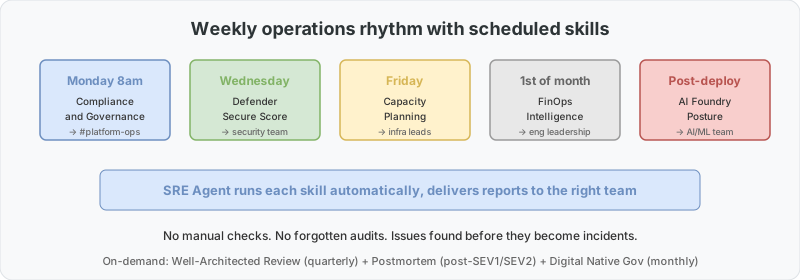
- Every Monday 8am: Run Compliance & Governance → Slack results to #platform-ops
- 1st of each month: Run FinOps Intelligence → Email cost report to engineering leads
- Every other Friday: Run Capacity Planning → Flag anything above 70% quota utilization
- After every deployment: Run AI Foundry Posture → Validate no security regressions
This is where SRE Agent moves from Level 3 (reactive intelligence) to Level 4 (proactive operations) on the SRE maturity model. You stop waiting for things to break and start finding issues before they become incidents.
Getting started
- Go to sre.azure.com → Skill Builder
- Click + Create skill, paste any SKILL.md from the repo
- Start with Digital Native Governance — fastest to see results
- Set a schedule or run on-demand
The repo includes sample outputs for every skill so you can preview what you’ll get before installing.
What’s next
The skills are open source (MIT) and designed to be customized. Each SKILL.md is self-contained: adjust thresholds, add checks specific to your domain, change scoring weights. The CONTRIBUTING.md has guidelines if you want to add new skills.
Ideas the community has already suggested:
- SLA/SLO monitoring dashboard
- Network topology validator
- Migration readiness assessment
- Disaster recovery drill runner
- Container Apps / AKS health check
If your team is running Azure SRE Agent and feeling the same gap between reactive and proactive, the repo is here. The community response in the first week (dozens of stars, multiple forks and contributions) tells me this resonates.
Next steps
- Install the skills pack — clone the repo, copy the skill folders into your SRE Agent configuration, and enable Skill 01 (Governance Audit) as a Scheduled Investigation running weekly.
- Run one investigation manually — trigger a governance audit against a non-production subscription. Review the output, adjust thresholds in
SKILL.mdto match your environment’s tolerance. - Add to your sprint rhythm — schedule FinOps (Skill 02) bi-weekly and Capacity Planning (Skill 05) monthly. After two cycles, you’ll have baseline data to prove proactive value to leadership.
Resources:
- Azure SRE Agent Skills Pack (GitHub)
- Azure SRE Agent Documentation
- Azure SRE Agent Portal
- Previous post: Your Startup Doesn’t Have an SRE Team, Now What?
Questions or want to share how you’re using SRE Agent? Leave a comment or open an issue on the repo.