Azure AI Foundry: from zero to production
What I cover when a customer asks “we want to build AI applications on Azure, where do we start?”
TL;DR: Azure AI Foundry is the unified platform for building AI apps on Azure. Start with Standard PAYGO, use Priority Processing selectively when latency matters but traffic is bursty, and move predictable baseline traffic to PTU when utilization exceeds 60-70%. Use ptucalc.com to model your costs before committing.
This guide is for engineering teams moving from prototype to production on Azure AI Foundry. If you’re still evaluating whether Foundry is the right platform, start at ai.azure.com.
The starting point
A few weeks ago, I had a conversation with a customer’s engineering team that was ready to build their first AI-powered application on Azure. They had experimented with ChatGPT, prototyped with the OpenAI API directly, and now needed to understand: how do we go from playground to production at enterprise scale?
That conversation became a workshop, then a deck, and now this guide. The questions they asked are the same ones I hear from every team making this jump.
What is Azure AI Foundry?
Azure AI Foundry is the unified platform for building, deploying, and operating AI applications on Azure. Think of it as the control plane for everything AI in your Azure environment:
- Model Catalog: 1,900+ models (OpenAI, Meta Llama, Mistral, Cohere, Phi, others)
- Prompt Engineering: playground, prompt flow, evaluation tools
- Deployment Options: Standard and Priority pay-per-token processing, Provisioned Throughput (PTU), Global/Data Zone routing
- Safety and Governance: content filters, red teaming tools, model monitoring
- Agent Framework: multi-step AI agents with tool-calling, code interpreter, file search
Foundry is not just another Azure service. It is the layer that ties models, data, compute, and governance together into one development surface.
The decisions you will face
Every team building on Foundry hits the same questions in roughly the same order.
1. Model selection
The model landscape in mid-2026:
| Model | Best for | Trade-off |
|---|---|---|
| GPT-5.x | Orchestration, complex reasoning, multi-step agents | Highest capability, highest cost |
| GPT-5-mini | Fast tasks, classification, summarization | 90% of GPT-5 quality at 20% of cost |
| GPT-4.1 | Legacy workloads (deprecating) | Stable but being superseded |
| Phi-4 | Edge deployment, fine-tuning, embedding | Small, fast, cheap, customizable |
| Llama 3.x | Open-weight flexibility, on-prem requirements | Full control, self-managed |
My recommendation for agentic workloads: GPT-5.x for the orchestrator (best tool-calling accuracy), GPT-5-mini for sub-tasks (classification, extraction, formatting), and Phi-4 or fine-tuned models for domain-specific components.
2. Model lifecycle
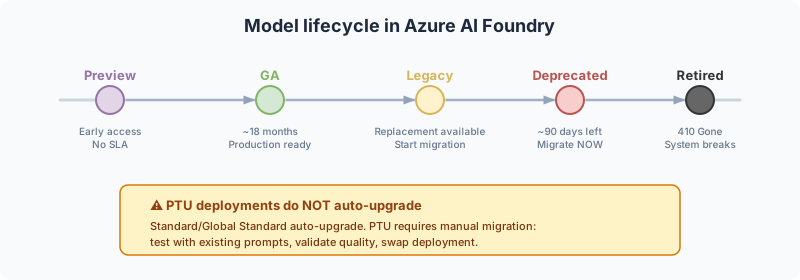
Every model in Foundry follows a lifecycle: Preview, GA, Legacy, Deprecated, Retired.
What matters in practice:
- GA lasts roughly 18 months. Sounds like a lot, but it goes fast when you have a system in production.
- Legacy means a replacement is available. Start planning migration.
- Deprecated gives you about 90 days to migrate. After that, the API returns 410 Gone and your system stops.
The critical detail: if you use Provisioned Throughput (PTU), model migration is NOT automatic. You must do it manually: plan a maintenance window, test the new model with existing prompts, validate quality, and swap. Standard/Global Standard deployments auto-upgrade, but you don’t control when.
My recommendation: create a model governance process. Monitor Azure Updates, maintain automated quality tests per model, and start migration planning at least 60 days before retirement.
3. Deployment type: Standard, Priority, or PTU
Most teams overthink this. The rule is simple:
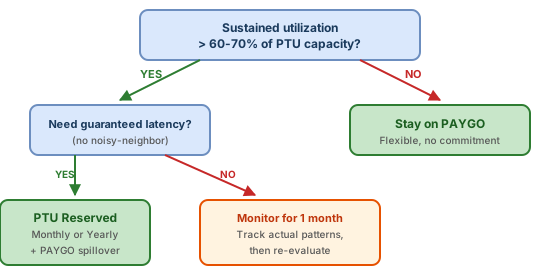
Start with PAYGO (Pay-As-You-Go) when:
- You’re in development/testing
- Traffic is unpredictable or bursty
- You’re still figuring out which models you’ll use long-term
Add Priority Processing when:
- The workload is user-facing and sensitive to latency
- Traffic is bursty or concentrated in business hours
- You want model-specific latency targets without reserving PTU capacity
Move to PTU (Provisioned Throughput Units) when:
- Sustained utilization exceeds 60-70% of equivalent PTU capacity
- You need guaranteed latency (no noisy-neighbor throttling)
- You’re running production workloads with predictable patterns
4. Where Priority Processing fits
Priority Processing is the middle ground between Standard PAYGO and PTU. It keeps pay-per-token billing and requires no reservation, but eligible requests are handled by a priority service tier with a defined, model-specific latency target. You can enable it for an entire Global Standard or US Data Zone Standard deployment, or select it per request with service_tier: "priority".
The benefit is simple: more consistent low latency for interactive agents, copilots, and other time-sensitive paths without paying for dedicated capacity during idle periods. A useful pattern is to reserve Priority Processing for requests users are actively waiting on, while background summarization, extraction, and evaluation stay on Standard. For predictable steady-state traffic, PTU is still the stronger economic and capacity choice.
Priority is not reserved capacity. Azure can process a request on the Standard tier during peak demand, for long-context requests on certain models, or when traffic increases by more than 50% tokens per minute in under 15 minutes. When that happens, the response reports service_tier: "default" and the request is billed at the Standard rate. Monitor ServiceTierRequest and ServiceTierResponse in Azure Monitor so you can see requested versus actual processing instead of assuming every request stayed on Priority.
Rule of thumb: Standard for flexible general traffic, Priority for latency-sensitive bursts, and PTU for predictable baseline throughput. Many production systems will use all three.
5. How PTU actually works
PTU is a token-bucket model. Each PTU reserves a fixed throughput in tokens per minute. The rate varies by model:
- GPT-5-mini: ~3,500 TPM per PTU
- GPT-5: varies by variant
- GPT-4.1: 3,000 TPM per PTU (deprecating)
So 100 PTUs of GPT-5-mini give you roughly 350,000 tokens/minute guaranteed. Go past that and the API returns 429. No queue, no wait. Hard cutoff.
6. The cost math (this is where it gets interesting)
| Tier | Price (reference Jul/2026) | Commitment |
|---|---|---|
| On-Demand | ~$2/hour/PTU = $14,400/month | None |
| Monthly Reserved | ~$0.72/hour/PTU = $5,184/month | 1 month |
| Yearly Reserved | ~$0.60/hour/PTU = $4,320/month | 1 year |
The break-even: if sustained utilization is above 60-70% of your PTU capacity, monthly reservation already beats PAYGO.
⚠️ These are reference prices as of July 2026. EA/MCA negotiated rates may differ. Always validate against your specific agreement.
I built ptucalc.com to help with exactly this calculation. It is open source. Plug in your usage patterns and it tells you the optimal tier and PTU count.
7. Spillover architecture
The pattern I recommend for production:
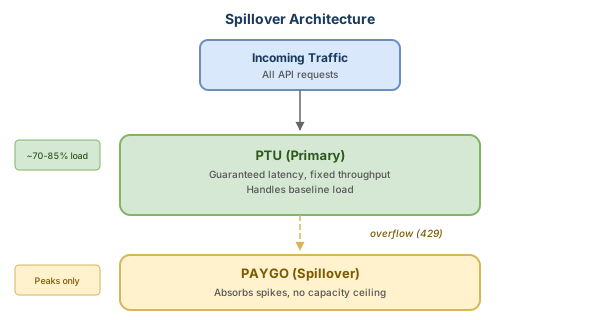
Configure your deployment with PTU as primary and PAYGO as spillover. You get:
- Guaranteed latency for your baseline traffic (PTU)
- No dropped requests during spikes (PAYGO absorbs overflow)
- Cost optimization (PTU for steady-state, PAYGO only for peaks)
You configure this at the deployment level in Foundry. No application code changes.
Part 2: production hardening
Everything above gets you running. The sections below get you running safely, at scale, with governance.
APIM as your AI Gateway
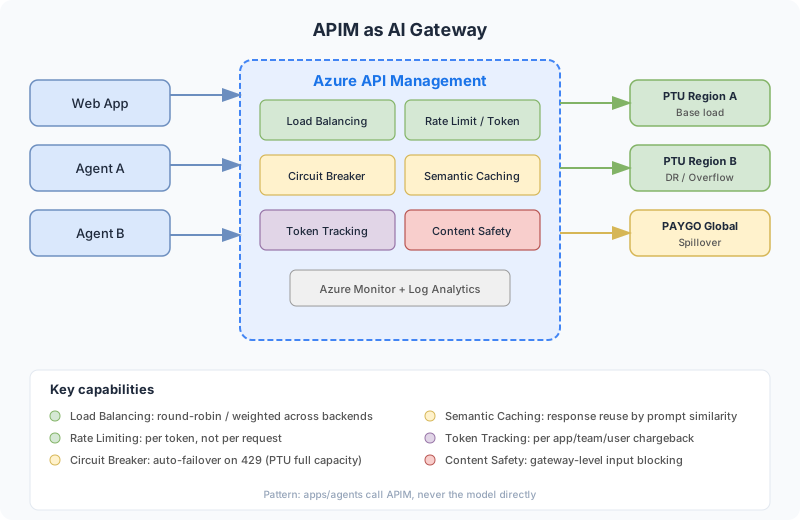
For any production AI workload, I recommend putting Azure API Management (APIM) between your applications and the models. APIM acts as a centralized AI Gateway with six capabilities that Foundry alone does not provide:
- Load balancing: round-robin or weighted distribution across multiple PTU/PAYGO backends. Enables DR and capacity distribution across regions.
- Rate limiting by token: unlike traditional rate limiting by request count, APIM counts actual tokens consumed. A request that uses 10,000 tokens weighs differently than one using 100. Much fairer for consumption control.
- Circuit breaker: when a PTU backend returns 429, APIM automatically fails over to the next backend (another PTU or PAYGO). No client-side retry needed.
- Semantic caching: caches responses by semantic similarity of the prompt. If someone asked something similar in the last N minutes, it returns from cache. Reduces cost and latency for recurring questions.
- Token tracking: consumption metrics per app, per team, per user. Emits to Azure Monitor. Essential for chargeback when multiple teams share the same models.
- Content safety: gateway-level policies that block malicious inputs before they reach the model. Defense in depth on top of Foundry’s content filters.
The pattern: your applications and agents call APIM, not the model directly. APIM routes, controls, monitors, and protects.
Reference architecture for agentic workloads
For teams building multi-agent systems, this is the reference architecture I recommend:
- Orchestration layer: a primary agent (typically using the best tool-calling model available, today GPT-5.x) that coordinates sub-agents, maintains conversation state, and decides the next action.
- Specialized agents layer: each agent optimized for a specific task using the right model. A data extraction agent on Phi-4, a compliance agent on GPT-4.1, a UX agent on GPT-5. Different models for different tasks, optimizing both cost and quality.
- Gateway layer (APIM): sits between agents and models. Each agent has different rate limits, routes to different models, and the circuit breaker protects against throttling. This is where you centralize governance.
- Models layer (Foundry): multiple deployments with PTU for base load and PAYGO for burst. Multi-region for DR. Spillover happens automatically via APIM routing.
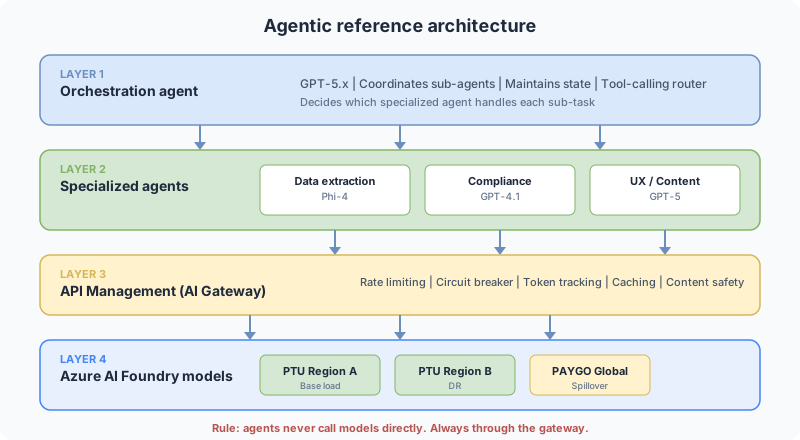
The key point: agents never call models directly. They always go through the gateway. If a misbehaving agent starts consuming too many tokens, you cut it at the gateway without touching the agent’s code.
If you’re running Azure SRE Agent alongside your AI workloads, skill 08 (AI Foundry & OpenAI Posture) can audit your Foundry deployment against these architecture patterns on a schedule. See my companion post: Custom skills for Azure SRE Agent.
Anti-patterns to avoid
These are mistakes I see repeatedly in production. Most of them seem obvious once pointed out, but they happen all the time:
| Don’t do this | Do this instead | Impact if ignored |
|---|---|---|
| API keys in code | Managed Identity + Key Vault | Credential leak, billing attack |
| One endpoint for everything | APIM Gateway + per-app routing | Noisy neighbor, no visibility |
| Provision for peak | Spillover (PTU base + PAYGO burst) | 60%+ idle capacity, waste |
| Ignore model lifecycle | Test pipeline + migration plan | 410 Gone in production, outage |
| Default max_tokens (4096) | Calculate max_tokens per use case | Inflated PTU utilization, capacity waste |
| Retry without backoff | Exponential backoff + jitter | Retry storm, cascading 429s |
The max_tokens one is subtle: Azure calculates PTU utilization based on input tokens PLUS reserved max_tokens, even if the actual response uses fewer. If you set max_tokens to 4096 but your typical response is 200 tokens, you are wasting capacity. ptucalc.com has a specific tool for this.
Production checklist
Things I check before any customer goes live:
Security and network
- Private endpoints configured (no public internet exposure)
- Managed Identity for authentication (no API keys in code)
- Content Safety filters tuned (not just defaults)
- VNet integration if required by compliance
- Data residency: model deployment region matches data requirements
- APIM as AI Gateway (no direct model access from applications)
Reliability
- Multi-region deployment (primary + failover)
- Retry logic with exponential backoff and jitter
- Circuit breaker pattern for downstream dependencies
- Health probes and availability monitoring
- Spillover configured (PTU primary, PAYGO overflow)
- Priority Processing scoped to latency-sensitive paths, not every request
- APIM load balancing across PTU backends
Observability
- Token consumption metrics in Azure Monitor
- Latency P50/P95/P99 dashboards
- Cost allocation tags on all Foundry resources
- Alerting on 429 rates (throttling indicator)
- Model performance evaluation pipeline (drift detection)
- APIM token tracking enabled (per app/team/user)
- Priority requests split by
ServiceTierRequestandServiceTierResponse
Cost governance
- Budget alerts configured
- Chargeback tags for multi-team environments
- PTU utilization monitoring (target: 70-85%)
- max_tokens tuned per use case (not default 4096)
- Regular review cadence (monthly) for tier optimization
Model governance
- Model lifecycle monitoring (Azure Updates subscription)
- Automated quality tests per model version
- Migration plan documented (60+ days before retirement)
- PTU migration runbook (manual swap required)
- Semantic caching configured in APIM for recurring queries
The typical progression
Most teams I work with follow this path:
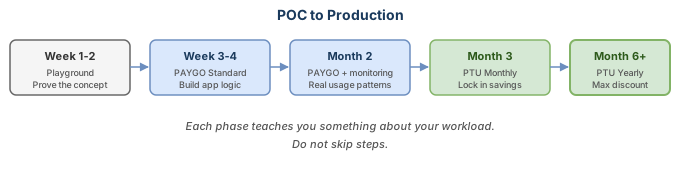
Don’t skip steps. Each phase teaches you something about your workload that informs the next decision.
Where to start
- Open the Foundry Playground and test models against your actual use cases
- Model your costs with ptucalc.com before committing to PTU
- Deploy with spillover from day one. It costs nothing extra when PTU handles the load, but saves you when spikes hit
- Set up monitoring early. You cannot optimize what you cannot measure
Next steps
- Deploy a model in Foundry — pick GPT-4o on PAYGO, wire it to a single endpoint, and run a test prompt through the REST API. Time: 20 minutes.
- Run ptucalc against your traffic — export your token consumption from Azure Monitor and model the break-even point. If you’re above 60% sustained utilization, PTU likely pays for itself.
- Add APIM in front — even in dev. Configure a single policy with token-rate-limit and emit-token-metric. This gives you observability and a retry layer from day one.
Resources:
- Azure AI Foundry
- Priority Processing documentation
- PTU Calculator
- Foundry Documentation
- Well-Architected Framework for AI
Questions about deployment strategy or cost modeling? Leave a comment.