This article was originally published at https://cloud.redhat.com/experts/aro/acm-odf-aro/
A guide to deploying Advanced Cluster Management (ACM) and OpenShift Data Foundation (ODF) for Azure Red Hat OpenShift (ARO) Disaster Recovery.
Overview
VolSync is not supported for ARO in ACM: https://access.redhat.com/articles/7006295 so if you run into issues and file a support ticket, you will receive the information that ARO is not supported.
In today’s fast-paced and data-driven world, ensuring the resilience and availability of your applications and data has never been more critical. The unexpected can happen at any moment, and the ability to recover quickly and efficiently is paramount. That’s where OpenShift Advanced Cluster Management (ACM) and OpenShift Data Foundation (ODF) come into play. In this guide, we will explore the deployment of ACM and ODF for disaster recovery (DR) purposes, empowering you to safeguard your applications and data across multiple clusters.
Sample Architecture
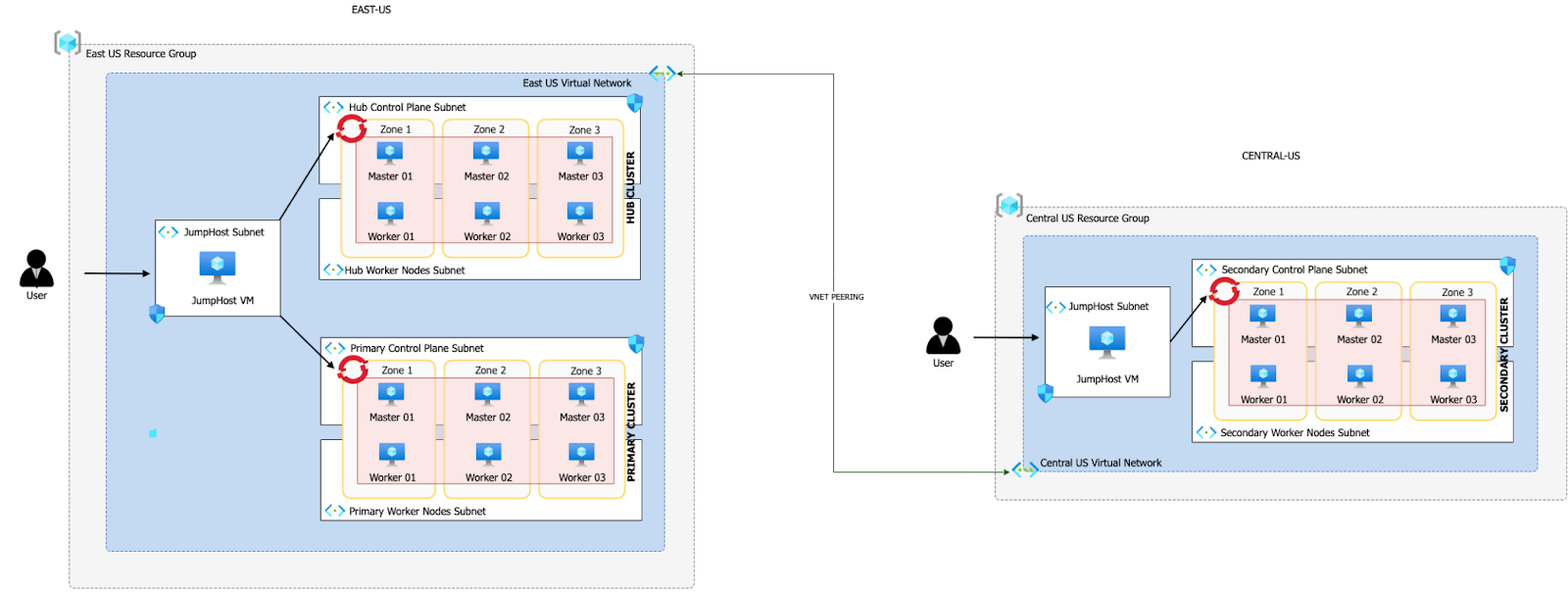
Hub Cluster (East US Region):
- This is the central control and management cluster of your multi-cluster environment.
- It hosts Red Hat Advanced Cluster Management (ACM), which is a powerful tool for managing and orchestrating multiple OpenShift clusters.
- Within the Hub Cluster, you have MultiClusterHub, which is a component of ACM that facilitates the management of multiple OpenShift clusters from a single control point.
- Additionally, you have OpenShift Data Foundation (ODF) Multicluster Orchestrator in the Hub Cluster.
- The Hub Cluster shares the same Virtual Network (VNET) with the Primary Cluster, but they use different subnets within that VNET.
- VNET peering is established between the Hub Cluster’s VNET and the Secondary Cluster’s dedicated VNET in the Central US region.
Primary Cluster (East US Region):
- This cluster serves as the primary application deployment cluster.
- It has the Submariner Add-On, which enables network connectivity and service discovery between clusters.
- ODF is also deployed in the Primary Cluster, providing storage and data services to applications running in this cluster.
Secondary Cluster (Central US Region):
- This cluster functions as a secondary or backup cluster for disaster recovery (DR) purposes.
- Similar to the Primary Cluster, it has the Submariner Add-On to establish network connectivity.
- ODF is deployed here as well, ensuring that data can be replicated and managed across clusters.
- The Secondary Cluster resides in its own dedicated VNET in the Central US region.
Prerequisites
Azure Account
- Log into the Azure CLI
az login
- Make sure you have enough Quota
az vm list-usage --location "East US" -o table
- Register resource providers
az provider register -n Microsoft.RedHatOpenShift --wait
az provider register -n Microsoft.Compute --wait
az provider register -n Microsoft.Storage --wait
az provider register -n Microsoft.Authorization --wait
Red Hat pull secret
- Log into https://cloud.redhat.com
- Browse to https://cloud.redhat.com/openshift/install/azure/aro-provisioned
- Click the Download pull secret button.
Manage Multiple Logins
rm -rf /var/tmp/acm-odf-aro-kubeconfig
touch /var/tmp/acm-odf-aro-kubeconfig
export KUBECONFIG=/var/tmp/acm-odf-aro-kubeconfig
Create clusters
- Set environment variables
export AZR_PULL_SECRET=~/Downloads/pull-secret.txt
export EAST_RESOURCE_LOCATION=eastus
export EAST_RESOURCE_GROUP=rg-eastus
export CENTRAL_RESOURCE_LOCATION=centralus
export CENTRAL_RESOURCE_GROUP=rg-centralus
- Create environment variables for hub cluster
export HUB_VIRTUAL_NETWORK=10.0.0.0/20
export HUB_CLUSTER=hub-cluster
export HUB_CONTROL_SUBNET=10.0.0.0/24
export HUB_WORKER_SUBNET=10.0.1.0/24
export HUB_JUMPHOST_SUBNET=10.0.10.0/24
- Set environment variables for primary cluster
export PRIMARY_CLUSTER=primary-cluster
export PRIMARY_CONTROL_SUBNET=10.0.2.0/24
export PRIMARY_WORKER_SUBNET=10.0.3.0/24
export PRIMARY_POD_CIDR=10.128.0.0/18
export PRIMARY_SERVICE_CIDR=172.30.0.0/18
- Set environment variables for secondary cluster
Note: Pod and Service CIDRs CANNOT overlap between primary and secondary clusters (because we are using Submariner).
export SECONDARY_CLUSTER=secondary-cluster
export SECONDARY_VIRTUAL_NETWORK=192.168.0.0/20
export SECONDARY_CONTROL_SUBNET=192.168.0.0/24
export SECONDARY_WORKER_SUBNET=192.168.1.0/24
export SECONDARY_JUMPHOST_SUBNET=192.168.10.0/24
export SECONDARY_POD_CIDR=10.130.0.0/18
export SECONDARY_SERVICE_CIDR=172.30.128.0/18
Deploying the Hub Cluster
- Create an Azure resource group
az group create  \
  --name $EAST_RESOURCE_GROUP  \
  --location $EAST_RESOURCE_LOCATION
- Create virtual network
az network vnet create  \
  --address-prefixes $HUB_VIRTUAL_NETWORK  \
  --name "$HUB_CLUSTER-aro-vnet-$EAST_RESOURCE_LOCATION"  \
  --resource-group $EAST_RESOURCE_GROUP
- Create control plane subnet
az network vnet subnet create  \
  --resource-group $EAST_RESOURCE_GROUP  \
  --vnet-name "$HUB_CLUSTER-aro-vnet-$EAST_RESOURCE_LOCATION"  \
  --name "$HUB_CLUSTER-aro-control-subnet-$EAST_RESOURCE_LOCATION"  \
  --address-prefixes $HUB_CONTROL_SUBNET
- Create worker subnet
az network vnet subnet create  \
  --resource-group $EAST_RESOURCE_GROUP  \
  --vnet-name "$HUB_CLUSTER-aro-vnet-$EAST_RESOURCE_LOCATION"  \
  --name "$HUB_CLUSTER-aro-worker-subnet-$EAST_RESOURCE_LOCATION"  \
  --address-prefixes $HUB_WORKER_SUBNET
- Create the cluster (30-45 minutes)
az aro create  \
    --resource-group $EAST_RESOURCE_GROUP  \
    --name $HUB_CLUSTER  \
    --vnet "$HUB_CLUSTER-aro-vnet-$EAST_RESOURCE_LOCATION"  \
    --master-subnet "$HUB_CLUSTER-aro-control-subnet-$EAST_RESOURCE_LOCATION"  \
    --worker-subnet "$HUB_CLUSTER-aro-worker-subnet-$EAST_RESOURCE_LOCATION"  \
    --version 4.12.25  \
    --apiserver-visibility Private  \
    --ingress-visibility Private  \
    --pull-secret @$AZR_PULL_SECRET
Deploying the Primary cluster
- Create control plane subnet
az network vnet subnet create  \
  --resource-group $EAST_RESOURCE_GROUP  \
  --vnet-name "$HUB_CLUSTER-aro-vnet-$EAST_RESOURCE_LOCATION"  \
  --name "$PRIMARY_CLUSTER-aro-control-subnet-$EAST_RESOURCE_LOCATION"  \
  --address-prefixes $PRIMARY_CONTROL_SUBNET
- Create worker subnet
az network vnet subnet create  \
  --resource-group $EAST_RESOURCE_GROUP  \
  --vnet-name "$HUB_CLUSTER-aro-vnet-$EAST_RESOURCE_LOCATION"  \
  --name "$PRIMARY_CLUSTER-aro-worker-subnet-$EAST_RESOURCE_LOCATION"  \
  --address-prefixes $PRIMARY_WORKER_SUBNET
- Create the cluster (30-45 minutes)
az aro create  \
  --resource-group $EAST_RESOURCE_GROUP  \
  --name $PRIMARY_CLUSTER  \
  --vnet "$HUB_CLUSTER-aro-vnet-$EAST_RESOURCE_LOCATION"  \
  --master-subnet "$PRIMARY_CLUSTER-aro-control-subnet-$EAST_RESOURCE_LOCATION"  \
  --worker-subnet "$PRIMARY_CLUSTER-aro-worker-subnet-$EAST_RESOURCE_LOCATION"  \
  --version 4.12.25  \
  --apiserver-visibility Private  \
  --ingress-visibility Private  \
  --pull-secret @$AZR_PULL_SECRET  \
  --pod-cidr $PRIMARY_POD_CIDR  \
  --service-cidr $PRIMARY_SERVICE_CIDR
Connect to Hub and Primary Clusters
- Create the jump subnet
az network vnet subnet create  \
  --resource-group $EAST_RESOURCE_GROUP  \
  --vnet-name "$HUB_CLUSTER-aro-vnet-$EAST_RESOURCE_LOCATION"  \
  --name jump-subnet  \
  --address-prefixes $HUB_JUMPHOST_SUBNET
- Create a jump host
az vm create --name jumphost  \
    --resource-group $EAST_RESOURCE_GROUP  \
    --ssh-key-values $HOME/.ssh/id_rsa.pub  \
    --admin-username aro  \
    --image "RedHat:RHEL:9_1:9.1.2022112113"  \
    --subnet jump-subnet  \
    --public-ip-address jumphost-ip  \
    --public-ip-sku Standard  \
    --vnet-name "$HUB_CLUSTER-aro-vnet-$EAST_RESOURCE_LOCATION"
- Save the jump host public IP address
EAST_JUMP_IP=$(az vm list-ip-addresses -g $EAST_RESOURCE_GROUP -n jumphost -o tsv  \
--query '[].virtualMachine.network.publicIpAddresses[0].ipAddress')
echo $EAST_JUMP_IP
- Use sshuttle to create a SSH VPN via the jump host (use a separate terminal session)
sshuttle --dns -NHr "aro@${EAST_JUMP_IP}" $HUB_VIRTUAL_NETWORK
- Get OpenShift API routes
HUB_APISERVER=$(az aro show  \
--name $HUB_CLUSTER  \
--resource-group $EAST_RESOURCE_GROUP  \
-o tsv --query apiserverProfile.url)

PRIMARY_APISERVER=$(az aro show  \
--name $PRIMARY_CLUSTER  \
--resource-group $EAST_RESOURCE_GROUP  \
-o tsv --query apiserverProfile.url)
- Get OpenShift credentials
HUB_ADMINPW=$(az aro list-credentials  \
--name $HUB_CLUSTER  \
--resource-group $EAST_RESOURCE_GROUP  \
--query kubeadminPassword  \
-o tsv)

PRIMARY_ADMINPW=$(az aro list-credentials  \
--name $PRIMARY_CLUSTER  \
--resource-group $EAST_RESOURCE_GROUP  \
--query kubeadminPassword  \
-o tsv)
- Log into Hub and configure context
oc login $HUB_APISERVER --username kubeadmin --password ${HUB_ADMINPW}
oc config rename-context $(oc config current-context) hub
oc config use hub
- Log into Primary and configure context
oc login $PRIMARY_APISERVER --username kubeadmin --password ${PRIMARY_ADMINPW}
oc config rename-context $(oc config current-context) primary
oc config use primary
Deploying the Secondary Cluster
- Create an Azure resource group
az group create  \
  --name $CENTRAL_RESOURCE_GROUP  \
  --location $CENTRAL_RESOURCE_LOCATION
- Create virtual network
az network vnet create  \
  --address-prefixes $SECONDARY_VIRTUAL_NETWORK  \
  --name "$SECONDARY_CLUSTER-aro-vnet-$CENTRAL_RESOURCE_LOCATION"  \
  --resource-group $CENTRAL_RESOURCE_GROUP
- Create subnets and cluster (30-45 minutes)
az network vnet subnet create  \
  --resource-group $CENTRAL_RESOURCE_GROUP  \
  --vnet-name "$SECONDARY_CLUSTER-aro-vnet-$CENTRAL_RESOURCE_LOCATION"  \
  --name "$SECONDARY_CLUSTER-aro-control-subnet-$CENTRAL_RESOURCE_LOCATION"  \
  --address-prefixes $SECONDARY_CONTROL_SUBNET

az network vnet subnet create  \
  --resource-group $CENTRAL_RESOURCE_GROUP  \
  --vnet-name "$SECONDARY_CLUSTER-aro-vnet-$CENTRAL_RESOURCE_LOCATION"  \
  --name "$SECONDARY_CLUSTER-aro-worker-subnet-$CENTRAL_RESOURCE_LOCATION"  \
  --address-prefixes $SECONDARY_WORKER_SUBNET

az aro create  \
    --resource-group $CENTRAL_RESOURCE_GROUP  \
    --name $SECONDARY_CLUSTER  \
    --vnet "$SECONDARY_CLUSTER-aro-vnet-$CENTRAL_RESOURCE_LOCATION"  \
    --master-subnet "$SECONDARY_CLUSTER-aro-control-subnet-$CENTRAL_RESOURCE_LOCATION"  \
    --worker-subnet "$SECONDARY_CLUSTER-aro-worker-subnet-$CENTRAL_RESOURCE_LOCATION"  \
    --version 4.12.25  \
    --apiserver-visibility Private  \
    --ingress-visibility Private  \
    --pull-secret @$AZR_PULL_SECRET \
    --pod-cidr $SECONDARY_POD_CIDR \
    --service-cidr $SECONDARY_SERVICE_CIDR
VNet Peering
Create a peering between both VNETs (Hub Cluster in EastUS and Secondary Cluster in Central US)
export RG_EASTUS=$EAST_RESOURCE_GROUP
export RG_CENTRALUS=$CENTRAL_RESOURCE_GROUP
export VNET_EASTUS=$HUB_CLUSTER-aro-vnet-$EAST_RESOURCE_LOCATION
export VNET_CENTRALUS=$SECONDARY_CLUSTER-aro-vnet-$CENTRAL_RESOURCE_LOCATION

VNET_EASTUS_ID=$(az network vnet show --resource-group $RG_EASTUS --name $VNET_EASTUS --query id --out tsv)
VNET_CENTRALUS_ID=$(az network vnet show --resource-group $RG_CENTRALUS --name $VNET_CENTRALUS --query id --out tsv)

az network vnet peering create --name "Link"-$VNET_EASTUS-"To"-$VNET_CENTRALUS  \
  --resource-group $RG_EASTUS  \
  --vnet-name $VNET_EASTUS  \
  --remote-vnet $VNET_CENTRALUS_ID  \
  --allow-vnet-access=True  \
  --allow-forwarded-traffic=True  \
  --allow-gateway-transit=True

az network vnet peering create --name "Link"-$VNET_CENTRALUS-"To"-$VNET_EASTUS  \
  --resource-group $RG_CENTRALUS  \
  --vnet-name $VNET_CENTRALUS  \
  --remote-vnet $VNET_EASTUS_ID  \
  --allow-vnet-access  \
  --allow-forwarded-traffic=True  \
  --allow-gateway-transit=True
Connect to Secondary cluster
- Create the jump subnet and host
az network vnet subnet create  \
  --resource-group $CENTRAL_RESOURCE_GROUP  \
  --vnet-name "$SECONDARY_CLUSTER-aro-vnet-$CENTRAL_RESOURCE_LOCATION"  \
  --name jump-subnet  \
  --address-prefixes $SECONDARY_JUMPHOST_SUBNET

az vm create --name jumphost  \
    --resource-group $CENTRAL_RESOURCE_GROUP  \
    --ssh-key-values $HOME/.ssh/id_rsa.pub  \
    --admin-username aro  \
    --image "RedHat:RHEL:9_1:9.1.2022112113"  \
    --subnet jump-subnet  \
    --public-ip-address jumphost-ip  \
    --public-ip-sku Standard  \
    --vnet-name "$SECONDARY_CLUSTER-aro-vnet-$CENTRAL_RESOURCE_LOCATION"
- Connect via sshuttle (in a separate terminal)
CENTRAL_JUMP_IP=$(az vm list-ip-addresses -g $CENTRAL_RESOURCE_GROUP -n jumphost -o tsv  \
--query '[].virtualMachine.network.publicIpAddresses[0].ipAddress')

sshuttle --dns -NHr "aro@${CENTRAL_JUMP_IP}" $SECONDARY_VIRTUAL_NETWORK
- Log into Secondary and configure context
SECONDARY_APISERVER=$(az aro show  \
--name $SECONDARY_CLUSTER  \
--resource-group $CENTRAL_RESOURCE_GROUP  \
-o tsv --query apiserverProfile.url)

SECONDARY_ADMINPW=$(az aro list-credentials  \
--name $SECONDARY_CLUSTER  \
--resource-group $CENTRAL_RESOURCE_GROUP  \
--query kubeadminPassword  \
-o tsv)

oc login $SECONDARY_APISERVER --username kubeadmin --password ${SECONDARY_ADMINPW}
oc config rename-context $(oc config current-context) secondary
oc config use secondary
Setup Hub Cluster
oc config use hub
Configure ACM
- Create ACM namespace
cat << EOF | oc apply -f -
apiVersion: v1
kind: Namespace
metadata:
  name: open-cluster-management
  labels:
    openshift.io/cluster-monitoring: "true"
EOF
- Create ACM Operator Group
cat << EOF | oc apply -f -
apiVersion: operators.coreos.com/v1
kind: OperatorGroup
metadata:
  name: open-cluster-management
  namespace: open-cluster-management
spec:
  targetNamespaces:
    - open-cluster-management
EOF
- Install ACM version 2.8
cat << EOF | oc apply -f -
apiVersion: operators.coreos.com/v1alpha1
kind: Subscription
metadata:
  name: advanced-cluster-management
  namespace: open-cluster-management
spec:
  channel: release-2.8
  installPlanApproval: Automatic
  name: advanced-cluster-management
  source: redhat-operators
  sourceNamespace: openshift-marketplace
EOF
- Check if installation succeeded
oc wait --for=jsonpath='{.status.phase}'='Succeeded' csv -n open-cluster-management \
  -l operators.coreos.com/advanced-cluster-management.open-cluster-management=''
- Install MultiClusterHub instance
cat << EOF | oc apply -f -
apiVersion: operator.open-cluster-management.io/v1
kind: MultiClusterHub
metadata:
  namespace: open-cluster-management
  name: multiclusterhub
spec: {}
EOF
- Check that the MultiClusterHub is running
oc wait --for=jsonpath='{.status.phase}'='Running' multiclusterhub multiclusterhub -n open-cluster-management \
  --timeout=600s
Configure ODF Multicluster Orchestrator
- Install the ODF Multicluster Orchestrator version 4.12
cat << EOF | oc apply -f -
apiVersion: operators.coreos.com/v1alpha1
kind: Subscription
metadata:
  labels:
    operators.coreos.com/odf-multicluster-orchestrator.openshift-operators: ""
  name: odf-multicluster-orchestrator
  namespace: openshift-operators
spec:
  channel: stable-4.12
  installPlanApproval: Automatic
  name: odf-multicluster-orchestrator
  source: redhat-operators
  sourceNamespace: openshift-marketplace
EOF
- Check if installation succeeded
oc wait --for=jsonpath='{.status.phase}'='Succeeded' csv -n openshift-operators \
  -l operators.coreos.com/odf-multicluster-orchestrator.openshift-operators=''
Import Clusters into ACM
- Create a Managed Cluster Set
oc config use hub

export MANAGED_CLUSTER_SET_NAME=aro-clusters

cat << EOF | oc apply -f -
apiVersion: cluster.open-cluster-management.io/v1beta2
kind: ManagedClusterSet
metadata:
  name: $MANAGED_CLUSTER_SET_NAME
EOF
- Retrieve token and server from primary cluster
oc config use primary
PRIMARY_API=$(oc whoami --show-server)
PRIMARY_TOKEN=$(oc whoami -t)
- Retrieve token and server from secondary cluster
oc config use secondary
SECONDARY_API=$(oc whoami --show-server)
SECONDARY_TOKEN=$(oc whoami -t)
Import Primary Cluster
oc config use hub

cat << EOF | oc apply -f -
apiVersion: cluster.open-cluster-management.io/v1
kind: ManagedCluster
metadata:
  name: $PRIMARY_CLUSTER
  labels:
    cluster.open-cluster-management.io/clusterset: $MANAGED_CLUSTER_SET_NAME
    cloud: auto-detect
    vendor: auto-detect
spec:
  hubAcceptsClient: true
EOF

cat << EOF | oc apply -f -
apiVersion: v1
kind: Secret
metadata:
  name: auto-import-secret
  namespace: $PRIMARY_CLUSTER
stringData:
  autoImportRetry: "2"
  token: "${PRIMARY_TOKEN}"
  server: "${PRIMARY_API}"
type: Opaque
EOF

cat << EOF | oc apply -f -
apiVersion: agent.open-cluster-management.io/v1
kind: KlusterletAddonConfig
metadata:
  name: $PRIMARY_CLUSTER
  namespace: $PRIMARY_CLUSTER
spec:
  clusterName: $PRIMARY_CLUSTER
  clusterNamespace: $PRIMARY_CLUSTER
  clusterLabels:
    cloud: auto-detect
    vendor: auto-detect
    cluster.open-cluster-management.io/clusterset: $MANAGED_CLUSTER_SET_NAME
  applicationManager:
    enabled: true
  policyController:
    enabled: true
  searchCollector:
    enabled: true
  certPolicyController:
    enabled: true
  iamPolicyController:
    enabled: true
EOF

oc get managedclusters
Import Secondary Cluster
cat << EOF | oc apply -f -
apiVersion: cluster.open-cluster-management.io/v1
kind: ManagedCluster
metadata:
  name: $SECONDARY_CLUSTER
  labels:
    cluster.open-cluster-management.io/clusterset: $MANAGED_CLUSTER_SET_NAME
    cloud: auto-detect
    vendor: auto-detect
spec:
  hubAcceptsClient: true
EOF

cat << EOF | oc apply -f -
apiVersion: v1
kind: Secret
metadata:
  name: auto-import-secret
  namespace: $SECONDARY_CLUSTER
stringData:
  autoImportRetry: "2"
  token: "${SECONDARY_TOKEN}"
  server: "${SECONDARY_API}"
type: Opaque
EOF

cat << EOF | oc apply -f -
apiVersion: agent.open-cluster-management.io/v1
kind: KlusterletAddonConfig
metadata:
  name: $SECONDARY_CLUSTER
  namespace: $SECONDARY_CLUSTER
spec:
  clusterName: $SECONDARY_CLUSTER
  clusterNamespace: $SECONDARY_CLUSTER
  clusterLabels:
    cloud: auto-detect
    vendor: auto-detect
    cluster.open-cluster-management.io/clusterset: $MANAGED_CLUSTER_SET_NAME
  applicationManager:
    enabled: true
  policyController:
    enabled: true
  searchCollector:
    enabled: true
  certPolicyController:
    enabled: true
  iamPolicyController:
    enabled: true
EOF

oc get managedclusters
Configure Submariner Add-On
- Create Broker configuration
cat << EOF | oc apply -f -
apiVersion: submariner.io/v1alpha1
kind: Broker
metadata:
  name: submariner-broker
  namespace: $MANAGED_CLUSTER_SET_NAME-broker
  labels:
    cluster.open-cluster-management.io/backup: submariner
spec:
  globalnetEnabled: false
EOF
- Deploy Submariner to Primary cluster
cat << EOF | oc apply -f -
apiVersion: submarineraddon.open-cluster-management.io/v1alpha1
kind: SubmarinerConfig
metadata:
  name: submariner
  namespace: $PRIMARY_CLUSTER
spec:
  IPSecNATTPort: 4500
  NATTEnable: true
  cableDriver: libreswan
  loadBalancerEnable: true
  gatewayConfig:
    gateways: 1
EOF

cat << EOF | oc apply -f -
apiVersion: addon.open-cluster-management.io/v1alpha1
kind: ManagedClusterAddOn
metadata:
     name: submariner
     namespace: $PRIMARY_CLUSTER
spec:
     installNamespace: submariner-operator
EOF
- Deploy Submariner to Secondary cluster
cat << EOF | oc apply -f -
apiVersion: submarineraddon.open-cluster-management.io/v1alpha1
kind: SubmarinerConfig
metadata:
  name: submariner
  namespace: $SECONDARY_CLUSTER
spec:
  IPSecNATTPort: 4500
  NATTEnable: true
  cableDriver: libreswan
  loadBalancerEnable: true
  gatewayConfig:
    gateways: 1
EOF

cat << EOF | oc apply -f -
apiVersion: addon.open-cluster-management.io/v1alpha1
kind: ManagedClusterAddOn
metadata:
     name: submariner
     namespace: $SECONDARY_CLUSTER
spec:
     installNamespace: submariner-operator
EOF
- Check connection status
oc -n $PRIMARY_CLUSTER get managedclusteraddons submariner -o yaml
Look for the connection established status:
message: The connection between clusters "primary-cluster" and "secondary-cluster"
  is established
reason: ConnectionsEstablished
status: "False"
type: SubmarinerConnectionDegraded
Install ODF
Primary Cluster
oc config use primary
Follow these steps to deploy ODF: https://cloud.redhat.com/experts/aro/odf/
Secondary Cluster
oc config use secondary
Follow these steps to deploy ODF: https://cloud.redhat.com/experts/aro/odf/
Finishing the setup of the disaster recovery solution
Creating Disaster Recovery Policy on Hub cluster
oc config use hub

cat << EOF | oc apply -f -
apiVersion: ramendr.openshift.io/v1alpha1
kind: DRPolicy
metadata:
  name: drpolicy
spec:
  drClusters:
    - primary-cluster
    - secondary-cluster
  schedulingInterval: 5m
EOF
Wait for DR policy to be validated (can take up to 10 minutes):
oc get drpolicy drpolicy -o yaml
Creating the Application and Failover
- Create namespace and PlacementRule
cat <<EOF | oc apply -f -
apiVersion: v1
kind: Namespace
metadata:
 name: busybox-sample
EOF

cat <<EOF | oc apply -f -
apiVersion: apps.open-cluster-management.io/v1
kind: PlacementRule
metadata:
  name: busybox-placementrule
  namespace: busybox-sample
spec:
  clusterSelector:
    matchLabels:
      name: primary-cluster
  schedulerName: ramen
EOF
- Create application with ACM
cat << EOF | oc apply -f -
apiVersion: app.k8s.io/v1beta1
kind: Application
metadata:
  name: busybox-sample
  namespace: busybox-sample
spec:
  componentKinds:
  - group: apps.open-cluster-management.io
    kind: Subscription
  descriptor: {}
  selector:
    matchExpressions:
      - key: app
        operator: In
        values:
          - busybox-sample
---
apiVersion: apps.open-cluster-management.io/v1
kind: Channel
metadata:
  annotations:
    apps.open-cluster-management.io/reconcile-rate: medium
  name: busybox-sample
  namespace: busybox-sample
spec:
  type: Git
  pathname: 'https://github.com/RamenDR/ocm-ramen-samples'
---
apiVersion: apps.open-cluster-management.io/v1
kind: Subscription
metadata:
  annotations:
    apps.open-cluster-management.io/git-branch: main
    apps.open-cluster-management.io/git-path: busybox-odr
    apps.open-cluster-management.io/reconcile-option: merge
  labels:
    app: busybox-sample
  name: busybox-sample-subscription-1
  namespace: busybox-sample
spec:
  channel: busybox-sample/busybox-sample
  placement:
    placementRef:
      kind: PlacementRule
      name: busybox-placementrule
EOF
- Associate the DR policy to the application
cat <<EOF | oc apply -f -
apiVersion: ramendr.openshift.io/v1alpha1
kind: DRPlacementControl
metadata:
  labels:
    cluster.open-cluster-management.io/backup: resource
  name: busybox-placementrule-drpc
  namespace: busybox-sample
spec:
  drPolicyRef:
    name: drpolicy
  placementRef:
    kind: PlacementRule
    name: busybox-placementrule
    namespace: busybox-sample
  preferredCluster: $PRIMARY_CLUSTER
  pvcSelector:
    matchLabels:
      appname: busybox-sample
EOF
- Failover sample application to secondary cluster
cat <<EOF | oc apply -f -
apiVersion: ramendr.openshift.io/v1alpha1
kind: DRPlacementControl
metadata:
  labels:
    cluster.open-cluster-management.io/backup: resource
  name: busybox-placementrule-drpc
  namespace: busybox-sample
spec:
  action: Failover
  failoverCluster: $SECONDARY_CLUSTER
  drPolicyRef:
    name: drpolicy
  placementRef:
    kind: PlacementRule
    name: busybox-placementrule
    namespace: busybox-sample
  pvcSelector:
    matchLabels:
      appname: busybox-sample
EOF
- Verify application runs in secondary cluster
oc config use secondary
oc get pods -n busybox-sample
Cleanup
az aro delete -y  \
  --resource-group rg-eastus  \
  --name hub-cluster

az aro delete -y  \
  --resource-group rg-eastus  \
  --name primary-cluster

az group delete --name rg-eastus

az aro delete -y  \
  --resource-group rg-centralus  \
  --name secondary-cluster

az group delete --name rg-centralus
Additional reference resources
- Virtual Network Peering
- Regional-DR solution for OpenShift Data Foundation
- Private ARO Cluster with access via JumpHost
- Deploy ACM Submariner for connect overlay networks ARO – ROSA clusters
- Configure ARO with OpenShift Data Foundation
- OpenShift Regional Disaster Recovery with Advanced Cluster Management